• Home
  • Software Testing Service
  • About US
    • Privacy Policy
    • Disclosure
  • Write For Us
  • Submit Software
  • Contact Us
    • Subscribe
I Love Free Software
Best free software available all over the web. The free software categories include Windows Software, Social Networking Tools, and software installation videos.


  • Featured
  • Windows
  • Web Applications
  • App Store
  • Android
  • iPhone
  • iPad
  • Windows 8
  • Social Networking
  • Programming Tools

Emergency USB Stick to Clean Infected Computer

By Zirkon Kalti on April 22, 2010 | Sponsored Links

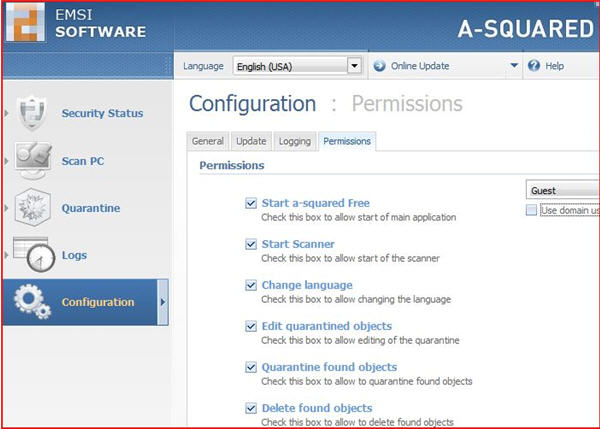
a-squared Emergency USB Stick is a free software that can scan and remove viruses and malware from your PC. Emergency USB stick can be copied on a USB Stick, and then you can plug this USB stick to any computer to clean it of viruses and malware.

Sponsored Links

Users don’t have to install the program in order to run it. The a-squared commandline scanner lets you runs the scanner from the commandline prompt. The commandline feature is developed for advance users and is suitable for performing multiple tasks in batch.

If this Emergency USB Stick is not enough to clean your computer, you can try VIPRE Rescue or SARDU.

To run the a-squared commandline scanner, run cmd.exe from the command prompt window. Use the USB Stick drive and navigate to the cd run folder which contains the executable files. Finally, type a2cmd.exe from the command prompt. After that, you should come to a page with a description of the parameters.

The supported scan parameters for the commandline which can be combined includes /f=[path]; /files=[path]; /m, /memory; /t, /traces; /c, /cookies; /quick; and /deep.

The supported scan options for parameters include /h, /heuristic; /r, /riskware; /a, /archive; /n, /ntfs, /l=[path]; /log=[path]; /la=[path]; /logansi=[path]; /x=[list]; /ext=[list]; /xe=[list]; /extexclude=[list]; /wl=[path]; /whitelist=[path]; /d, /delete; /dq, /deletequick; and /q=[folder], /quarantine=[folder].

The supported parameters of malware that can be used are /ql, /quarantinelist; /qr=[n], /quarantinerestore=[n]; and /qd=[n], /quarantinedelete=[n]. The general parameters are /s, /service; /u, /update; and /?, /help.

Here are some of the features of this Free a-squared Emergency USB Stick:

  • Include a-squared scanner
  • Graphical user interface
  • Detect Trojans, malware, worms, dialers, keyloggers and etc from your computer system
  • Runs the a-squared Free by double clicking on the a2Free.exe
  • Transfer the malware to quarantine and delete it
  • a-squared Commandline Scanner lets you run the scanner from the command prompt window by typing a2cmd.exe
  • Include the setup files for the updated versions of a-squared Anti-Malware, a-squared Anti-Dialer, a-squared HiJackFree and Mamutu.
Home Page: Click Here
Works With: Windows
Free / Paid: Free

Link to This Page:


You Might Also Like:

  1. Download Emsisoft Emergency Kit Clean Malware Infected PC
  2. Panda SafeCD: Clean Malware Infected Computer by CD/USB
  3. A-Squared Free: Free Anti-Virus and Anti-Malware
  4. USB Guardian To Protect Computer Against Infected USB Drives
  5. VIPRE Rescue: Clean PC infested with Virus

Be the first to know about Latest Free Software:

  • Join us on Facebook
  • Subscribe to our RSS Feed
  • Follow us on Twitter
  • Subscribe to Email Updates:

Posted in Security Software | Tagged usb software | Leave a response

Zirkon Kalti

« Previous Next »

Featured Posts

  • 5 Free Snippet Managers To Manage Code Snippets
  • 5 Free Online Tools To Test Website In Different Resolutions
  • 5 Free Microsoft Access Alternatives
  • 5 Free IP Notifier Apps
  • 5 Online Mapping Websites
  • 5 Free Alternatives To iGoogle
  • 7 Websites To Download Windows 8 Themes
  • 5 Best Free Calculator Apps For Windows 8

Join More than 15,000 Followers!

Enter your Email Address
  • Submit Software
  • Software Testing Service
  • Write For Us
  • About Us
  • Privacy Policy
  • Disclosure
  • Contact Us

Link to Us:

Did we review your software here? Feel free to flaunt this badge on your website:

Free Software

Use this Code:

Copyright © 2013 I Love Free Software.

Powered by WordPress and Hybrid. New - H