Microsoft SharedView is a free screen sharing software. You can share screens with up to 15 people with this free screen sharing software. In order for you to connect to your friends or colleagues, both you and the person should have SharedView installed on the computer. Whether you want to share documents with your team members, fix any issue on your friend’s computer, you can do it all with SharedView.
Update: (September 09, 2013) The software has been removed from Microsoft’s site on 3 February 2012. You can check out some similar software reviewed by us: Quick Screen Share, Join Me, and Screenleap.
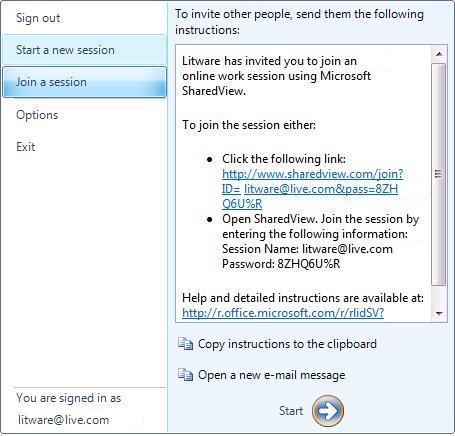
How to Share Screens with Microsoft SharedView:
For starting a session on Microsoft SharedView, you need to sign in the application by making use of a Windows Live ID. You can make use of any email address or nickname to join a session. The name that you choose will be the name that will be visible to others in the session. Once you have signed in into the application, you can click on Start a new session and send the invitation text to your friend via email. When your friend clicks on the invitation link that he/she receives in the email, the SharedView application will launch. He/She will then have to enter the name of the session and password to join the session. Audio support is not available yet on SharedView.
[Also Read: 5 Free Software to Remotely Connect to Your Computer]
Features of Microsoft SharedView:
- Free screen sharing software.
- Official product from Microsoft.
- Can connect to up to 15 people at one time.
- Real-time file sharing.
- Simple user interface.
- Multiple chat sessions.
- No adware, spyware, bugs.
- Personal Mouse Pointer feature.
- Accessible from Windows Live Messenger.
Some other screen sharing software that we reviewed earlier include: TeamViewer, and Mikogo.
Click here to to check out Microsoft SharedView.
