Windows Improver combines three different system utilities into one application, system maintenance, performance boosting and disk junk removal. Each one of these three system improvement avenues has several different tools. Tools which are not native to Windows Improver but they are rather just links to Windows tools who’s existence many people are not even aware of and those who start using Windows Improver will be surprised when they find out how much they can improve Windows performance without installing any kind of third party utilities.
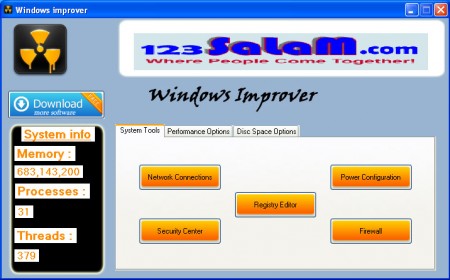
Every button that you see above is a shortcut to a built-in Windows utility. In a sense Windows Improver would be a control center type of app which holds shortcuts to all of the more important Windows tools for PC tune up.
Advantages to using Windows Improver
Various utilities that exist out there are very good at what they do, but they have a drawback in the fact that they themselves cause PC clutter to increase, to some small extent at least. There has been cases where people have overdid it with various cleaners, always installing new ones thinking that they will help increase PC performance. Windows cleaning utilities, which come with the system can eliminate a lot of problems that are causing system slow downs. Open up Windows Improver and you will find a lot of those Windows utilities, here’s a list of the more useful ones.
- Startup programs editing
- Windows services editor
- Disk management
- Disk cleanup
- Defragmentation utility
Out of all these, two tools which people have probably never heard of, because they’re hidden somewhere deep in Windows menus, would be the Disk cleanup and Windows services management.
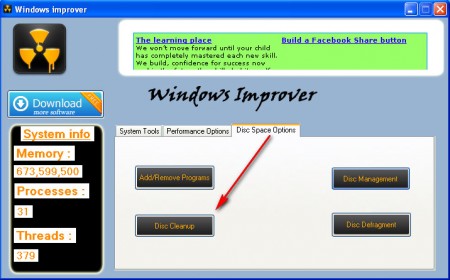
Start the Disk cleanup utility by clicking on Disk Space Options and then selecting the Disk cleanup button at the bottom of the screen. Great thing about Disk cleanup utility that Windows has to offer is that it can free up a lot of space which regular cleaning program wouldn’t. A lot of files that can be cleaned or at least compressed are not checked because system utilities like Glary Utilities, Soluto and Tweak Me do not know if it’s safe for them to manipulate these files. When it comes to what Windows needs, and what Windows doesn’t need, Windows knows best, and that’s why with Disk cleanup you can, if you haven’t checked your system with this app in a long time, release a lot of free space.
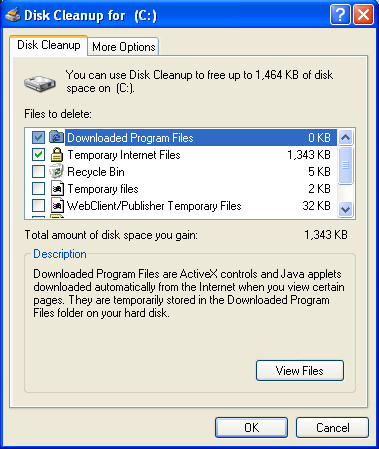
From the image above, you can see that there are a lot of different places where Disk cleanup looks for files to be cleansed, some of the same places that third party cleaners wouldn’t look at.
For other things like disk defragmentation, startup programs editing you also do not need to install any additional apps, because Windows has them all. If you are not sure about what exactly Windows hides under the hood, then grab yourself a copy of Windows Improver and see what kind of tools are being offered there, you might not find everything that’s needed for successful PC tune up, but there’s plenty of tools for basic system cleanup.
