• Home
  • Software Testing Service
  • About US
    • Privacy Policy
    • Disclosure
  • Write For Us
  • Submit Software
  • Contact Us
    • Subscribe
I Love Free Software
Best free software available all over the web. The free software categories include Windows Software, Social Networking Tools, and software installation videos.


  • Featured
  • Windows
  • Web Applications
  • App Store
  • Android
  • iPhone
  • iPad
  • Windows 8
  • Social Networking
  • Programming Tools

Assign Higher Priority to Active Program in Windows: TopWinPrio

By Ishan Bansal on November 29, 2010 | Sponsored Links

TopWinPrio is a free software to change default priority of running programs in Windows. You can assign higher priority to active program, so that it is able to use more resources, while other programs in background get to use lesser resources.

When you run multiple programs in Windows, all of them get same priority, and run at same level of slowness. However, you might want the active program (the one that you are using) to run comparatively faster. TopWinPrio is a simple solution for that.
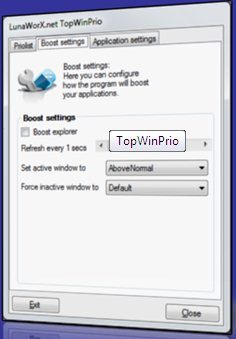
TopWinPrio
Sponsored Links

TopWinPrio keeps checking all the running programs to see which program is being currently used. It then automatically assigns a higher priority to that, as compared to other running programs. This ensures that Windows first tries to allocate more resources to this program, before allocating resources to others. You then get a better performance for the program that you are using.

Some other programs that deal with priority include: Control bandwidth of Internet applications, and Email prioritization software.

You can also exclude programs from the list to which you do not want to allocate higher resources. For example, you might want to Exclude Windows Explorer from the boost.

You can setup the time interval at which TopWinPrio checks active programs. You can specify the time in seconds. A good setting would be 5 seconds.

TopWinPrio is really handy if your PC has limited resources, and you tend to run many programs together. Then your active program would get Above normal priority, while background programs get a lower priority.

Home Page: Click Here
Works With: Windows
Free / Paid: Free

Link to This Page:


No related posts.

Be the first to know about Latest Free Software:

  • Join us on Facebook
  • Subscribe to our RSS Feed
  • Follow us on Twitter
  • Subscribe to Email Updates:

Posted in System Utilities | Tagged program priority | 1 Response

Ishan Bansal

  • Pingback: Velocizzate l’esecuzione dei programmi in uso con TopWinPrio

« Previous Next »

Featured Posts

  • 5 Apps For Windows 8 To Record Sound
  • Top 7 Free Launchers for Android
  • 5 Free Snippet Managers To Manage Code Snippets
  • 5 Free Online Tools To Test Website In Different Resolutions
  • 5 Free Microsoft Access Alternatives
  • 5 Free IP Notifier Apps
  • 5 Online Mapping Websites
  • 5 Free Alternatives To iGoogle

Join More than 15,000 Followers!

Enter your Email Address
  • Submit Software
  • Software Testing Service
  • Write For Us
  • About Us
  • Privacy Policy
  • Disclosure
  • Contact Us

Link to Us:

Did we review your software here? Feel free to flaunt this badge on your website:

Free Software

Use this Code:

Copyright © 2013 I Love Free Software.

Powered by WordPress and Hybrid. New - H