• Home
  • Software Testing Service
  • About US
    • Privacy Policy
    • Disclosure
  • Write For Us
  • Submit Software
  • Contact Us
    • Subscribe
I Love Free Software
Best free software available all over the web. The free software categories include Windows Software, Social Networking Tools, and software installation videos.


  • Featured
  • Windows
  • Web Applications
  • App Store
  • Android
  • iPhone
  • iPad
  • Windows 8
  • Social Networking
  • Programming Tools

ZoomIt: Draw and Zoom on Screen During Presentations

By Ishan Bansal on March 8, 2010 | Sponsored Links

ZoomIt is a free software that lets you zoom into parts of your screen, and draw on your screen. This is a really useful feature while you are giving presentations, and need to highlight some section of screen. This also comes handy if yu are preparing some training videos. ZoomIt is completely free, and easy to use.

Whenever I am giving some online presentation by sharing my screen, I always feel a need to be able to quickly zoom some sections of my screen. For example, I might want to quickly zoom into a set of buttons to talk about what each button does. Similarly, I also feel a need to be able to quickly draw on my screen while talking about some new idea or application, to visually explain more clearly what I am talking about.

(Some of the free services that you can use to share your screen online: DimDim, Yugma, Mikogo)

I did not have a solution to do this till now. But thankfully,  ZoomIt would let me do exactly that.

Sponsored Links

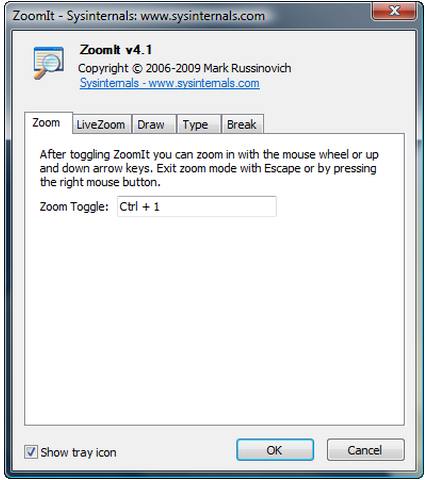
ZoomIt makes it extremely simple to zoom sections of your screen. When you start ZoomIt, it keeps running in system tray. You can quickly bring it up by pressing your chosen hotkey combination. This will bring up the zoom window. The zoom window will move with your mouse cursor, so you can quickly zoom any other part of the screen that you want.

ZoomIt lets you specify a separate set of hotkey for Drawing. Pressing that hotkey combination will bring up a pen on screen, and you can quickly draw using your mouse. You can specify pen color and size.

A great feature of ZoomIt is that it even lets you draw on Zoomed window.

I really like ZoomIt for it simplicity, and its usefulness. I am going to be a regular user of it during my presentations.

Home Page: Click Here
Works With: Windows 7, Windows Vista, Windows XP, Windows Server 2003
Free / Paid: Free

Link to This Page:


No related posts.

Be the first to know about Latest Free Software:

  • Join us on Facebook
  • Subscribe to our RSS Feed
  • Follow us on Twitter
  • Subscribe to Email Updates:

Posted in Business Software, Desktop Enhancement, Productivity Software | Tagged training, web presentations, zoom | Leave a response

Ishan Bansal

« Previous Next »

Featured Posts

  • 5 Apps For Windows 8 To Record Sound
  • Top 7 Free Launchers for Android
  • 5 Free Snippet Managers To Manage Code Snippets
  • 5 Free Online Tools To Test Website In Different Resolutions
  • 5 Free Microsoft Access Alternatives
  • 5 Free IP Notifier Apps
  • 5 Online Mapping Websites
  • 5 Free Alternatives To iGoogle

Join More than 15,000 Followers!

Enter your Email Address
  • Submit Software
  • Software Testing Service
  • Write For Us
  • About Us
  • Privacy Policy
  • Disclosure
  • Contact Us

Link to Us:

Did we review your software here? Feel free to flaunt this badge on your website:

Free Software

Use this Code:

Copyright © 2013 I Love Free Software.

Powered by WordPress and Hybrid. New - H