Tweeki is a free Twitter desktop client for Windows which you can use to completely replace your browser when it comes to reading new tweets, posting your own updates, reading messages and doing pretty much everything else that you are doing when browsing Twitter with Firefox, Chrome or any other browser that you might be using.
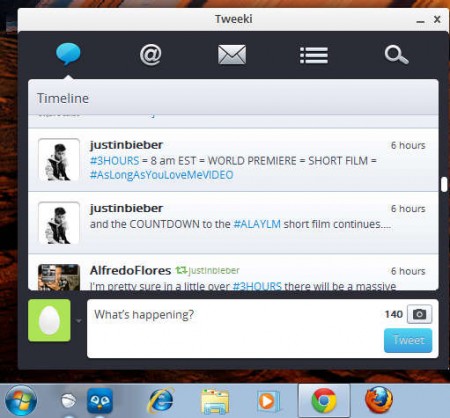
This free Twitter PC client will install itself in the Windows taskbar, like you can see on the image above. After installation is completed, a login window will pop up, where you need to sign in with your username and password and also authenticate Tweeki so that it can access your Twitter account. With Tweeki, like we mentioned, you get everything that you need to use Twitter easily and seamlessly, right from your desktop. Some of the features that you get are:
- Timeline reading – see new tweets from the people you’re following
- Mentions tracking – see who exactly mentioned you in their tweets
- Send and receive messages – check for any direct messages that you have
- Monitor created lists or lists to which you’ve subscribed to
- Search Twitter for contacts or posts with certain keywords
- Send tweets with images, post retweets
All of the above mentioned features that Tweeki has are nicely arranged in tabs, through which you browse in order to reach what you’re looking for. Default tab is of course the Timeline tab, the one that you can see on the image above, this is where you will probably be spending most of your time.
Similar software: TwitContact, Destroy Twitter.
Reading Twitter Timeline without a browser
Those of you who are interested to know how exactly can Twitter be used without opening up the browser should really look into desktop clients, programs made specifically for browsing and using a specific website or a social network. They are very similar to smartphone apps, only they work on regular computers.

On the image above we can see how easy it is to post tweets with the help of Tweeki. First step would obviously be to open up the Tweeki application, by clicking on the icon in the taskbar. Timeline tab, the first one from the left should be open by default, and at the bottom you’ll see the New Tweet box. Important thing to notice would be the small image icon above the tweet button, which you can use to upload images.
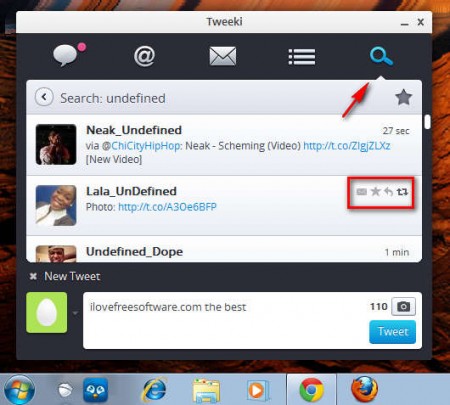
Mouse hover over tweets is gonna activate the options for retweeting, contacting the person via direct messages, and you can even create Tweet favorites where you can store tweets that you like the most.
Tweeki is completely free, simply leave it running in the taskbar and do your work on the computer that you’d be normally working, after which you can just click on the Tweeki and see what’s new on Twitter. The small window that Tweeki has is a lot less conspicuous than having actual browser open and checking on updates like that, and it takes a lot less resources also, so make sure to give this free Twitter PC client a try, free download.
