• Home
  • Software Testing Service
  • About US
    • Privacy Policy
    • Disclosure
  • Write For Us
  • Submit Software
  • Contact Us
    • Subscribe
I Love Free Software
Best free software available all over the web. The free software categories include Windows Software, Social Networking Tools, and software installation videos.


  • Featured
  • Windows
  • Web Applications
  • App Store
  • Android
  • iPhone
  • iPad
  • Windows 8
  • Social Networking
  • Programming Tools

MODI: Free Image Editor to Batch Edit Images

By Ishan Bansal on July 27, 2010 | Sponsored Links

Modi is a free computer software program that can process images powerfully and flexibly. It contains previews of each image and you can save multiple operations as a preset. This is a very flexible software to use when it comes to processing multiple images.

You have many different operations that you can use when it comes to Modi. Adding frames, convert to black and white and sharpen are just some of the things that are included with this particular software. No matter what type of image you have, Modi can work with it.

Modi is pretty good at doing bulk operation. We also reviewed a bulk image converter recently.

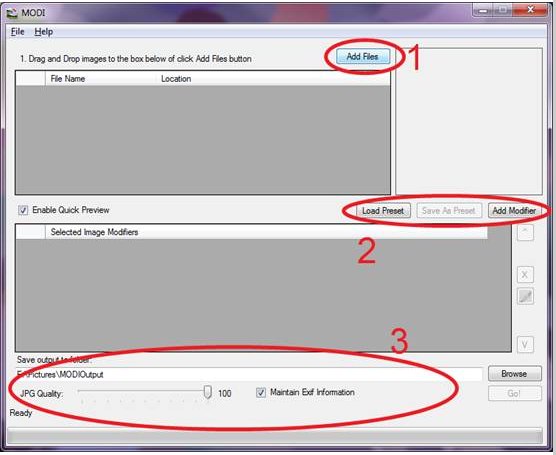
Modi free computer software program can be used to add images, sharpen image and crop for starters. This would be a good software to use for photographers and those that use images daily such as desktop publishers. There are unlimited ways to use Modi with photographs and images from saved files. All you do is simply drag and drop into a program window. It is extremely easy to do simply operations with MODI, like, add watermark to images.

Sponsored Links

Previews of each image can be seen by either hovering over the file or on the right hand side. You can then use any type of modifiers that you want to use. Previews allow you to see the pictures before editing.

All you would do would be to load MODI to your Windows system, and then click on the image to start. This program will require the Microsoft .Net framework but it doesn’t require installation to your hard drive to work well. It also runs on all Windows versions. You can then get to work editing your images with multiple choices such as auto level, reduce noise and other options that are available with this particular program. This is a simple and easy to use program.

Features of MODI Batch Image Processor:

  • Add files
  • Add text or image watermark
  • Convert to black and white
  • Crop
  • Resize
  • Add frame
  • Sharpen image

Some other image editors that we earlier reviewed include Paint.Net, Picturenaut, and virtualStudio.

Home Page: Click Here
Works With: Windows
Free / Paid: Free

Link to This Page:


You Might Also Like:

  1. Digital Image Tool: Free Batch Processing of Images
  2. Image Tools: Bulk Image Converter, Resizer, Cropper, Watermarker
  3. Free Online Image Editor to Edit RAW Photos and Images: Fix Picture
  4. Batch Image Resizer Batch Image Converter – ImRe
  5. Download Falco Image Studio: Free Image Editor

Be the first to know about Latest Free Software:

  • Join us on Facebook
  • Subscribe to our RSS Feed
  • Follow us on Twitter
  • Subscribe to Email Updates:

Posted in Image & Photo Editors | Tagged add watermark to images, free image editor, free photo editing, free photo editing software, image converter, image editor, image watermark | Leave a response

Ishan Bansal

« Previous Next »

Featured Posts

  • Top 7 Free Launchers for Android
  • 5 Free Snippet Managers To Manage Code Snippets
  • 5 Free Online Tools To Test Website In Different Resolutions
  • 5 Free Microsoft Access Alternatives
  • 5 Free IP Notifier Apps
  • 5 Online Mapping Websites
  • 5 Free Alternatives To iGoogle
  • 7 Websites To Download Windows 8 Themes

Join More than 15,000 Followers!

Enter your Email Address
  • Submit Software
  • Software Testing Service
  • Write For Us
  • About Us
  • Privacy Policy
  • Disclosure
  • Contact Us

Link to Us:

Did we review your software here? Feel free to flaunt this badge on your website:

Free Software

Use this Code:

Copyright © 2013 I Love Free Software.

Powered by WordPress and Hybrid. New - H