Linxy App is a free iPhone app to search word meaning through iPhone camera. This iPhone app is truly a nice app which lets you take a picture of any word in a physical book or newspaper, and then it searches for its meaning on internet.
Recently we wrote about OCR feature of Google Translate app for Android. Linxy app brings similar OCR capability to iOS.
Now, the concept of the app is simple. You just have to launch the app on your iPhone and focus your iPhone camera to the word for which you want to search the meaning. Now, the app identifies the word and search the meaning of the focused word. You will then see the pop-up below on your iPhone screen containing the meaning of the word. I really liked the app as it made your work easier.

Linxy app makes efficient use of your iPhone camera apart from taking pictures and recording video. The app works good when you search for the meaning of the word written on a piece of paper, book, or any other medium. But when you scan and search for the word meaning from your computer screen, the app finds it a bit difficult. You can fix the difficulty by making the font size bigger. Make the font size bigger and the app will easily identify the word and search for the appropriate meaning from its smart English word dictionary.
How To Use Linxy And Search Word Meaning:
Step 1: Download and install Linxy app.
Step 2: Launch the app.
Step 3: Focus your iPhone camera to the word for which you want to search the meaning.
Step 4: You will see a pop-up showing the word meaning.
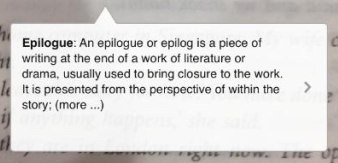
Step 5: Tap on the pause button to let the app freeze and let you read the meaning of the word.
Features Of Linxy App:
- Search word meaning through iPhone camera.
- Searches the meaning from inbuilt dictionary.
- Works offline.
- Flash light button provided depending on the device supportability.

- Zoom in and zoom out feature.
- Play/pause word meaning search.
- Ads-free app in App Store.
- Only supports the iPhone.

Check out dictionary apps for iPad reviewed by us.
Install Linxy:
Click here to download and install Linxy app from App Store. You can also scan the QR Code below and download the app directly on your iPhone.

Linxy app makes your work easier by searching the word meaning when you are offline. Also, you don’t have to type and search the word meaning. Linxy app can be used anytime and anywhere you find any difficult word.
