Here is the list of 5 best free screen capture software for Windows.
All these screen capture software come with different screen capture modes. Each one of them has its own built-in editor as well. Whether you have to capture a specific region of desktop screen, or the full desktop screen, you can use any of this software. All of these have their own unique features as well, such as: record desktop screen, capture freehand shot, capture a series of screenshots, and more.
Unlike simple and traditional screenshot capture tools, this software are handier. From enhancing the screenshots to saving them to PC, this software do it all. Let’s have a look at this screen capture software.

Note: This article was completely updated on May-29-2014
Monosnap
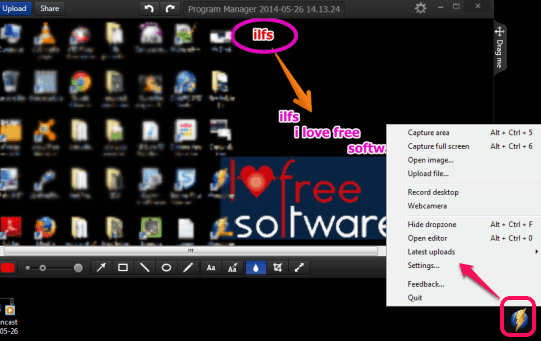
Monosnap is the best free screen capture software in this list. It comes with many special features. My favorite features of this software are desktop screen recording and free cloud storage space. For free cloud storage space, you need to create a free account with Monosnap. It is quite handy software that lets you capture screenshots (full screen or a specific region) and save them to PC. Before saving screenshots to PC, its built-in editor can be used to enhance screenshot. It provides multiple tools, such as: text tool, color tool, line tool, circle tool, rectangle tool, etc. to enhance the captured screenshot. A blur tool is also available to blur any area of screenshot. Screenshot can be saved to PC (in PNG or JPG) or you can share it on Twitter or Facebook.
It comes with screen recording feature as well. This feature is really useful to create a video of desktop screen. Along with recording desktop screen, it is capable to record the system sound as well. Moreover, for screen recording, it also gives annotation tools to highlight or focus on a particular area. Once recording is completed, you can save it to PC as MP4 file, and can also upload it to your Monosnap account. If you want, you can even try to upload it on your YouTube account. However, this feature didn’t work for me, and result to upload video to YouTube came with an error.
Monosnap is easy to use and runs in system tray. To use it more easily, it provides a so-called ‘dropzone’ (a Monosnap icon). Clicking on that icon will open up all the options it provides to capture screenshot and record desktop.
Check the full review of Monosnap.
Mr Shot
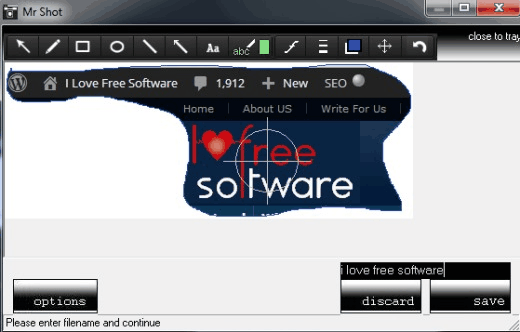
Mr Shot is another handy screen capture software that comes with a beautiful interface. I liked this software because of its unique freehand shape screenshot capture feature and screenshot enhancing feature. With its special freehand capture feature, you can capture screenshot in any random shape. Apart from this, it lets you capture desktop screen, an active window, and a particular region of desktop screen. Thus, all the needed screenshot capture modes are present in this software. For saving the screenshot, it provides jpg format by default. But you can set output format as png, tiff, or bmp format as well. It also comes with a built-in editor which is another handy feature. For adding annotations, you can use this screenshot editor. The screenshot editor of this software provides various annotation tools, like: pencil tool, text tool, font selection tool (to set font style, size, and font), arrow tool, line tool, color tool, rectangle tool, ellipse tool, gauge tool to choose line width, etc.
Mr Shot runs silently in system tray and provides hotkeys to capture screenshots. These hotkeys can also be customized by users. Also for screenshot capture, it provides an option to enable/disable mouse cursor capture.
Here is the full review.
Bug Shooting
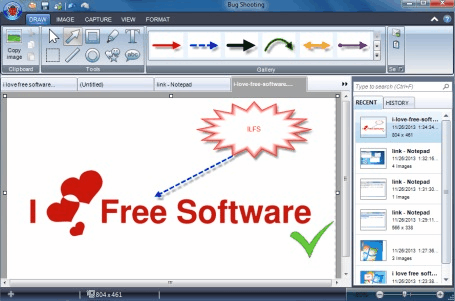
Bug Shooting is one of the best screenshot software that provides many special features. It is completely free to use only for personal use. First of all, it helps you to capture a whole series of screenshots with different screenshot modes. That means, you can capture full desktop screen, an object, capture screenshot using webcam, a particular region, an active window one by one, and it will keep storing those screenshots. As soon as you finish screenshot capture process, it will open screenshots in different tabs in its built-in editor. Its editor contains multiple annotation tools that you can apply on your screenshot. Each tool comes with many different styles which is quite rare to find in any other screenshot capture software. Moreover, screenshot editor also helps to view recently captured screenshots as well as view full history of screenshots. Apart from enhancing captured screenshots, it also lets you open saved screenshots or images with its editor to edit them. This is another handy feature as most of the screenshots only lets you edit captured screenshots. If you want, you can even add snapshot delay (in seconds) to take screenshot.
Bug Shooting is also integrated with multiple output types to take action for captured screenshots. That means, you can save screenshot (as png, gif, jpeg, or gif image) either to PC, can upload it to your FTP server, open it with MS Word, MS Excel, etc. Moreover, you can also enable output option to attach screenshot with Microsoft Outlook, Skype, Thunderbird, Upload screenshot on ImageShack, and more.
To use this screen capture software for personal use, you have to get a free license by registering on its homepage.
Check full review here.
CaptureIt Plus
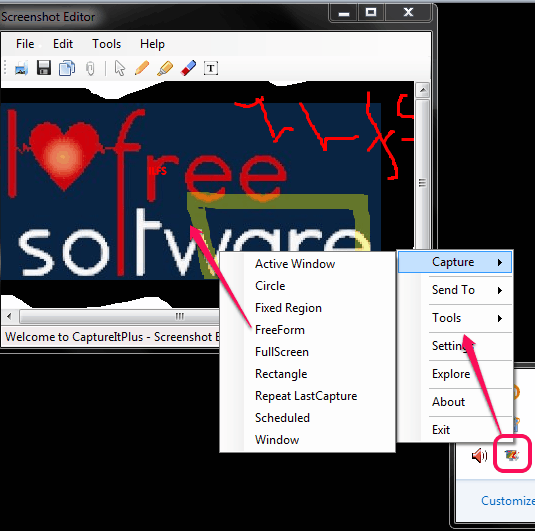
CaptureIt Plus is a very handy software that comes with 9 different screen capture modes. It lets you capture a fixed region, full screen, rectangular area, active window, freeform (freehand capture), Repeat LastCaputure mode, circle, window capture, and scheduled mode to capture screenshot with a time delay. Thus, it provides screenshot modes more than any other software. Apart from this, it is handy to pick color from desktop screen. Moreover, it is also able to create a simple animated gif using supported images present on your PC. Another interesting thing about this software is that you can send captured screenshot either to default image editor, clipboard, OneDrive, can post it your Facebook account, FTP Server, Imgur, Twitter, etc. Like above mentioned software, it also comes with a screenshot editor. But to open screenshot with this editor, you first have to set it by accessing Settings. Its screenshot editor comes with only basic tools, but is handy to use in screenshot. You can use pen tool, highlighter tool, and text tool.
CaptureIt Plus also lets you add watermark to your screenshot which is also a good feature. You can add a custom text as watermark, can select font size, color for that text, and position to appear on your screenshot. It is very easy to use and lightweight also. Setup file is just 447 KB in size. Once installed, it runs in system tray. You can right-click its tray icon to select any capture mode. Moreover, you can also set hotkeys to quickly use a particular screenshot capture mode.
Check out its full review.
iWeSoft Screenshot Capture
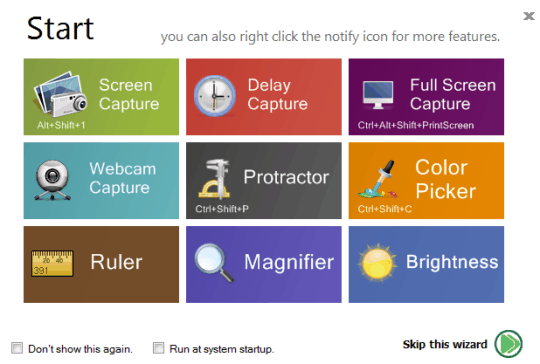
iWeSoft Screenshot Capture (or Free Screenshot Capture) is another handy screenshot capture software. It can help you to capture screenshot with webcam, capture full screen, a specific part of screen, and take screenshot in ellipse shape. Moreover, you can also take screenshot with a time delay (in seconds). Like all the above software, it also provide its own built-in editor to use annotation tools. What makes it more useful are the additional tools that come with it. It provides a color picker tool and a ruler to measure the length of objects on desktop screen. Apart from this, screen magnifier tool is also available using which you can zoom in any text or object visible on your desktop screen. An interesting feature that comes with this software is a whiteboard that covers whole desktop screen for drawing. You can draw anything and can save it as png, gif, jpg, or bmp format.
iWeSoft Screenshot Capture provides a wizard window to use all the available tools. Or else, you can even right-click on its tray icon to use a tool or capture screenshot with any possible mode. It is less than 6 MB in size and quite easy to use as well.
Check out its full review.
Conclusion:
As all these screen capture software come with valuable features, it is a bit difficult to choose the best one. Still, my vote goes for Monosnap software. Its beautiful interface and features to capture screenshot, record desktop screen, online cloud storage space has made it best screen capture software for me. But all other software are also very handy. Choose the best one for you.
