PrintEco is a free printout optimization utility which you can use to optimize Office documents and website articles which you’re printing from web browsers. PrintEco will scan the documents that you decide to print and it will try and save both paper and ink, hence its name. The goal of this free printout optimization software is to help the nature and also save you money on paper and ink, especially ink, since they are exceptionally expensive.
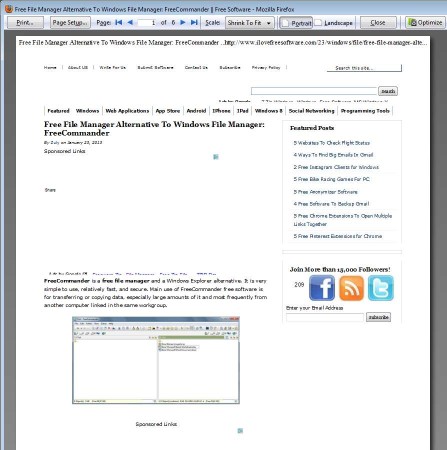
On the image above you can see an example of a website article that’s ready for being printed using Mozilla Firefox, which is just one of the browsers which is supported by PrintEco. You can see the button for starting and accessing PrintEco in the top right corner of the screen. That’s pretty much all that you get, PrintEco is actually a plugin which you can install on several applications from Microsoft Office and several different browser. Key features of this free print optimization utility are:
- Free and easy to use – one installation for both browsers and Office
- Supports Word, Power Point, Excel, Chrome, Firefox and Explorer
- Removes unnecessary links, menus and content when printing websites
- Changes formatting and optimizes printout to save paper and ink
- Allows you to use only text when formatting text and images
- Is a plugin – integrates with the print function of supported apps
For personal use, PrintEco can be downloaded for free, however if you are planning on using it in a company or business of any kind, you’re gonna have to upgrade your account. Considering how much money you’ll be saving by optimizing the documents that you’re printing which means making sure that ink and paper are not wasted, it’s more than worth the money spent. Here’s a few pointers to help you get started.
How to optimize document printouts, save paper and ink with PrintEco
After installation all the supported applications that you have installed will have the PrintEco plugin installed. Edit the document in Word, spreadsheet in Excel, presentation in Power Point or open a website article in one of the supported web browsers. Select File or the Office icon in the top left corner and there should now be PrintEco option listed, if everything was installed properly.
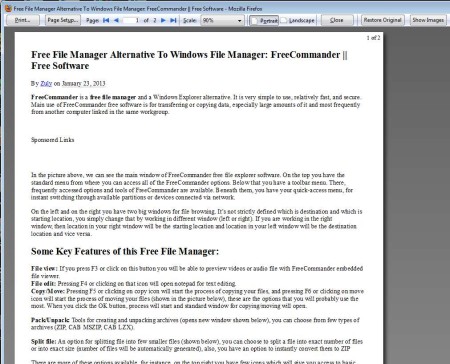
On the first image all the way at the top you can see a printout which isn’t optimized. This image shows us how a website article is optimized without any images being used. Click on the Show Images option if you want the printout reformatted with images.

We used Firefox on the examples above, but the same principles apply to any of the supported applications. Note that using image means that you’ll be using more ink.
Conclusion
PrintEco might not perform every optimization as good as it should, but the ink and paper efficiency is a lot better with the optimizations than without them, that’s for sure. Give it a try also if you want to quickly remove all the images from the printout. Give it a try and see how it goes, and what kind of results you’ll get. Free download.
