• Home
  • Software Testing Service
  • About US
    • Privacy Policy
    • Disclosure
  • Write For Us
  • Submit Software
  • Contact Us
    • Subscribe
I Love Free Software
Best free software available all over the web. The free software categories include Windows Software, Social Networking Tools, and software installation videos.


  • Featured
  • Windows
  • Web Applications
  • App Store
  • Android
  • iPhone
  • iPad
  • Windows 8
  • Social Networking
  • Programming Tools

Twuffer: Free Website to Schedule Future Tweets

By Ishan Bansal on February 24, 2010 | Sponsored Links

Twuffer is a free online service that lets you schedule tweets in the future. Login with your Twitter account and get started.

You can compose the tweets, and then set the time at which you want them to go live. You can schedule tweets for a long time in the future, and Twuffer will take care of posting those tweets at your scheduled time.

schedule tweets
Sponsored Links
How to Schedule Tweets:

Twuffer is a website where you schedule your tweets. You don’t need to install anything and it’s completely free.

Steps to schedule tweets:

  • Open the Twuffer website.
  • Login with your Twitter account.
  • Then start typing your tweet into the box.
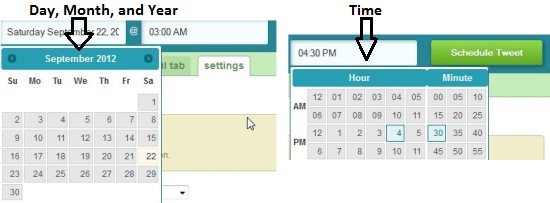
  • Schedule the day, month, year, and time when to tweet as shown below.
schedule tweets time

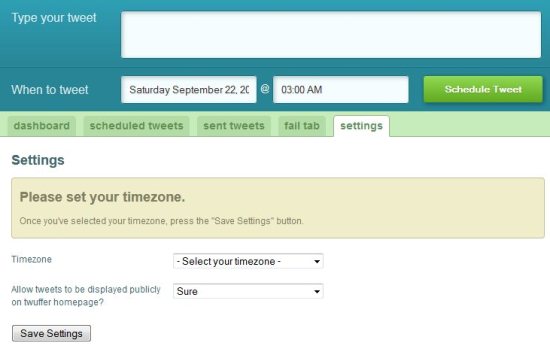
  • Be sure to set your time zone in settings menu.
  • Then click on Schedule Tweet.
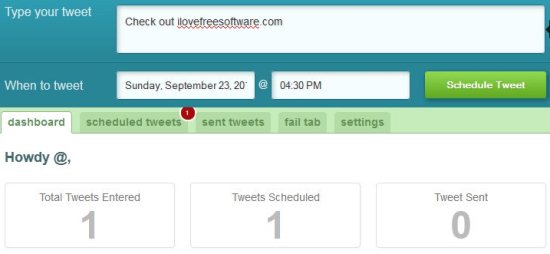
  • You can always have a look at how many tweets entered, schedules, and sent in the dashboard menu.
schedule tweets dashboard

  • In the scheduled tweets menu, you can see the tweets that you have scheduled in this tab.
  • In sent tweets you can see the tweets that are posted in your twitter. You can see the tweets according to date scheduled or date created; and in ascending or descending order.
  • In Fail Tab you can see the tabs that have failed to post. Here also you can sort failed tweets according to date scheduled and date created.
  • In settings tab you can change time zone and allow tweets to be displayed publicly option is also available.

The beauty of Twuffer lies in its simplicity. You just write the tweet, and pick the scheduled time, and you are done. You don’t need to download or install anything, and it is a completely free tool to schedule tweets. I had earlier reviewed another software called Twaitter that lets you schedule tweets, and do much more stuff.

Click here to go to Twuffer Homepage.

Home Page: Click Here
Free / Paid: Free

Link to This Page:


You Might Also Like:

  1. Tweek Auto Post – Schedule Tweets for Future
  2. 5 Free Twitter Tools to Schedule Tweets for Future
  3. Schedule Tweets with FutureTweets [Free]
  4. TwitRobot: Schedule Future and Recurring Tweets
  5. Buffer: Chrome Twitter Extension to Schedule Tweets

Be the first to know about Latest Free Software:

  • Join us on Facebook
  • Subscribe to our RSS Feed
  • Follow us on Twitter
  • Subscribe to Email Updates:

Posted in Twitter Tools | Tagged free twitter tool, future tweets, schedule tweets, twitter, twuffer | Leave a response

Ishan Bansal

« Previous Next »

Featured Posts

  • 5 Free Snippet Managers To Manage Code Snippets
  • 5 Free Online Tools To Test Website In Different Resolutions
  • 5 Free Microsoft Access Alternatives
  • 5 Free IP Notifier Apps
  • 5 Online Mapping Websites
  • 5 Free Alternatives To iGoogle
  • 7 Websites To Download Windows 8 Themes
  • 5 Best Free Calculator Apps For Windows 8

Join More than 15,000 Followers!

Enter your Email Address
  • Submit Software
  • Software Testing Service
  • Write For Us
  • About Us
  • Privacy Policy
  • Disclosure
  • Contact Us

Link to Us:

Did we review your software here? Feel free to flaunt this badge on your website:

Free Software

Use this Code:

Copyright © 2013 I Love Free Software.

Powered by WordPress and Hybrid. New - H