Photo! Editor is a free photo editing software which can be used by all those who are creating photos with their digital cameras. Sometimes photos don’t turn out the way they should, one example would be the famous red eyes that can ruin otherwise good looking photos. Now with Photo! Editor you can easily correct red eyes with the very quick and simple to use red eye removal tool, which is only one of several very useful tools which you can use to manipulate photos and images with Photo! Editor.
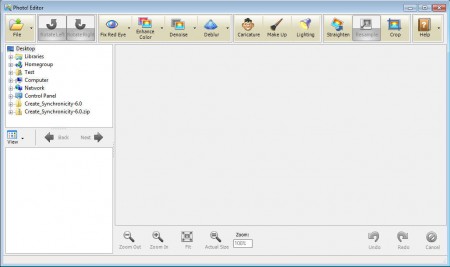
Interface of Photo! Editor is very modern looking, as you can see from the screenshot above. The main tools are all clearly laid out for us in the upper toolbar, which kinda looks like the user interface design that Office 2007 has and of course that the upcoming Office 2013 is gonna have. In the left sidebar we have the file browser where you can find your image collection and then see image previews at the frame below. On the right we have the main work area where you can edit photos. To do that you can use tools from the Photo! Editor arsenal, some of the more interesting ones would be:
- Color enhancer – add more color to bland photos
- Red Eye Removal tool – to fix the previously mentioned red eyes
- Deblur – try to fix blurry photos, which happen when camera is shaken
- Crop – cut down the large images which all of the major cameras create
- Caricature – create caricatures from images of you and your friends
Before you’ll be able to use all of the previously mentioned tools you’re gonna have to open up the photos that you want to edit first. Don’t worry, the list of supported formats which can be opened and saved by Photo! Editor is quite good. All of the common formats like JPEG/JPG, PNG, GIF and BMP are supported.
Similar software: VicMan’s Photo Editor, Virtual Studio Free, GIMP.
How to edit, manipulate and correct photos using Photo! Editor
You can open images by going to File >> Open, or from the preview window in the lower left corner of the screen.
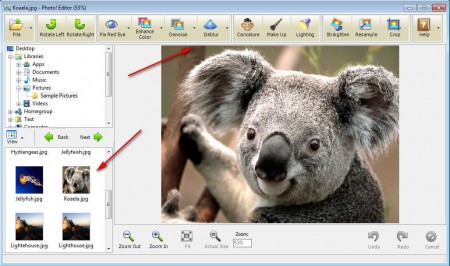
Once the image is loaded, you’ll should go over the image editing tools from the list above, and select the ones that you want to apply. Let’s say that you want to crop the image, select the Crop tool and then mark the rectangular area that you want cropped.
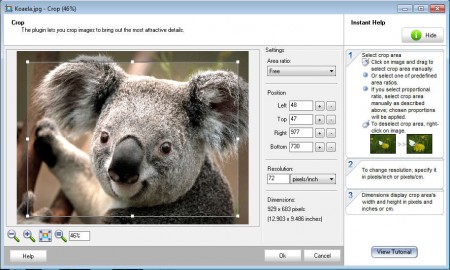
On the right you’re gonna be able to read instruction on how to use the tool. The same type of tutorial is available for every other tool, and the same MO is use for other tools as well. Very simple and effective.
Conclusion
Very simple and easy to use interface is what makes Photo! Editor a very useful tool which should be installed on computer of both beginners and professionals. With Photo! Editor you won’t have to open other paid apps, which are all cumbersome and large. For a beginner, photo editing tools offered in Photo! Editor are more than enough.
