Identity Finder is identity anti-theft software which has an interesting approach to computer identity protection. Identity Finder will scan documents and files and search for any mention of sensitive information like credit card numbers, usernames and passwords which can be easily stolen by countless malware that exists out there. After finding vulnerable documents and files where your sensitive data is mentioned Identity Finder will report it and offer you several solutions how you can fix these security risks.

Default screen that you get after running the application would be the ones that you see above. This is where you can choose between two different ways of how Identity Finder works, via a search wizard, which is the simpler way of doing things, or you can use the Advanced Interface where all the options are shown, see how it looks on the image below.
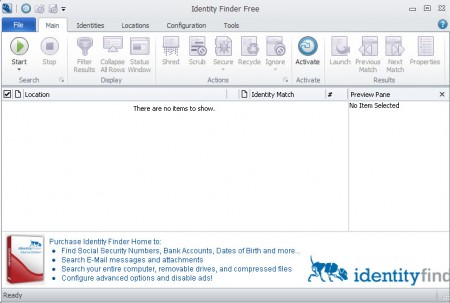
Using Identity Finder to improve sensitive information security
Before you get either one of the windows above, you’re gonna have to setup a program password. Password that you set will be used when opening the application. Since the company which created Identity Finder also offers password and personal data protection software, which is paid software, then password protecting the Finder makes sense. It also makes sense because if it comes into wrong hands, someone might dig up personal information when they end up at your computer without your supervision.
If you are looking for password protecting applications, have a look at yagodu, ID Vault, KeypItSafe.
With the wizard and the advanced interface of Identity Finder the vulnerability scan is started by clicking on the Start Scan button. What the program will do then is scan the entire system, every file for any mention of usernames and passwords or credit card number similar patterns in files that it finds.
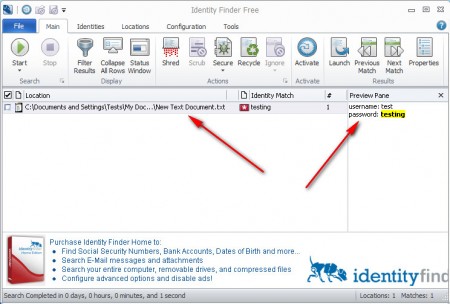
For the sake of the test we decided to create a .txt document and place inside the following:
username: test

password: testing
Of course these are not a genuine account, but Identity Finder didn’t know that, and it has detected the document which we’ve created, see image above. All that was necessary for detection was the keywords uesername and password to be present in a file, and it turned up as danger very easily. File formats that Identity Finder can read and scan through are:
- Word formats
- Excel formats
- Power Point formats
- text files
- HTML documents
A lot of times after making a transaction online, we are left with a document where important information about us can be saved. Some even use unprotected documents to save usernames and passwords. This is a huge security threat, because malware can use the same trick that Identity Finder uses, find private information and steal it, send it to its master.
With Identity Finder you can scan your computer for vulnerabilities that can cause you to lose information, not just for online accounts but also credit card information, which in turn means that you can lose money. If you have a lot of files which you suspect could contain passwords, credit card numbers, but you don’t want to go through them all, use Identity Finder it will locate them for you in no time.
