VirtuaWin is a free software to create virtual desktops in Windows for free. Virtual Desktop creation is primarily a Linux/Unix feature. But VirtuaWin extends that same capability to Windows for free.
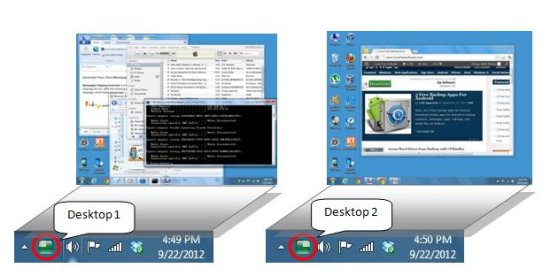
VirtualWin lets you create several virtual desktops, or workspaces. Then you can organize your applications across those workspaces. So, you can have one set of applications in one workspace, and second set of applications running in other workspace. That makes your desktop a lot more organized.
Getting starting with VirtuaWin:
VirtuaWin is designed to be simple and elegant to use yet still be highly configurable and extensible. All users can quickly understand it, and easily use it. Just download the portable version of VirtuaWin and install it in your computer. When you launch VirtuaWin, it will create four different instances of your desktop, by default. You can see a small icon of virtuaWin in your system tray area. You can configure VirtuaWin, or move to any version of the desktop through this icon. You can run separate applications on each version and switch between these versions anytime.
VirtuaWin helps you to organize multiple applications across the different versions of your desktop. You can make use of this great feature when you have multiple programs open on your desktop and you don’t have enough screen space to accommodate all of them together.
Switch between Virtual Desktops:
You can easily switch between different instances of your desktop. Just right click on the system tray icon of VirtuaWin and click on the “Move to Desktop” option. It will open a dropdown where you can see options to move to any virtual desktop.
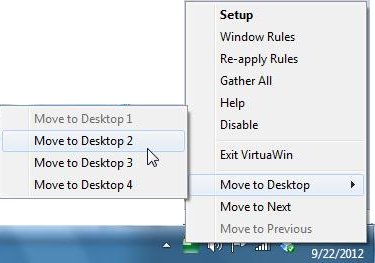
You can also choose the “Move to Next” and “Move to Previous” options to switch between the desktops successively.
Other similar software you may refer: Virtual Dimension, BlackSmith, and nSpaces.
VirtuaWin Setup:
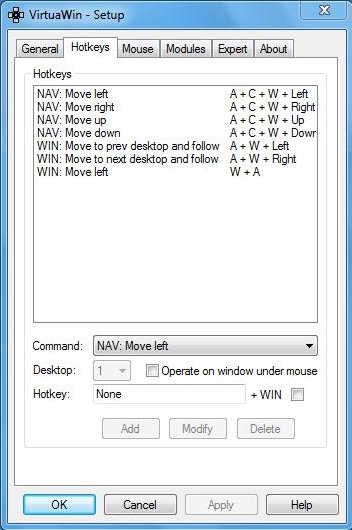
The right click on the system tray icon also provides access to the Setup menu. Here, you can configure VirtuaWin to customize each of your desktop, set hot keys, and manage mouse behavior.
Key Features of VirtuaWin:
- Create Customized Virtual Desktops: VirtuaWin lets you create up to 20 different instances of your desktop, which you can customize through its setup window.
- HotKeys: You can assign different hot key combinations to several navigation tasks.
- Quickly Switch Between Virtual Desktops: You can easily move from one desktop to another and the movement is quite fast.
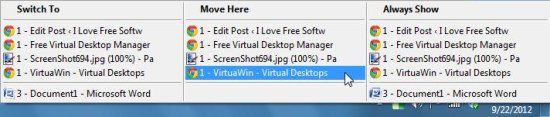
- Gather All: You can gather all the desktops together; i.e., you can gather all the applications that are running on different virtual desktops to your current desktop.
- Switch To: This option lets you quickly switch to any application running on any of the desktop version.
- Always show: You can choose any application to be shown on any of the desktop version to which you move.
- Move Here: You can choose any application from another desktop version to move on the current desktop version.
The Final Verdict:
VirtuaWin is a useful and handy tool to create multiple versions of your desktop where you can run different programs. It can be very useful in case you have lot of applications open on your desktop and you find it difficult to switch between those applications through a single interface. VirtuaWin is totally free.
