WhatsApp Messenger is a Free cross-platform mobile messaging application. WhatsApp can be used in platforms like Symbian, Android, iPhones and Blackberry for sending messages across the world. It is an alternative to SMS and MMS provided that one should have an internet connection. This mobile messaging application saves money and is an excellent medium of sending SMS and MMS Free across the world.

Just Switch to WhatsApp Application and send unlimited messages to friends and family for Free. You can enjoy group chats with your friends and family. You don’t have to pay any extra cost for sending an email across the country or in any part of the world. Also no need to pay any extra cost to send SMS or MMS through WhatsApp internationally. Chat unlimited with your friends who are abroad or outside the country without any international SMS cost.
Also now no need to remember any username or password for “signing” in to WhatsApp Messenger as it works through the phone number running on your Android device. Also WhatsApp integrates with the existing phone book in an easy way. It also saves your messages when you are Offline. WhatsApp saves your messages automatically incase you miss your push notifications or you instantly turn off your phone by mistake.
WhatsApp also has an option to send an invitation SMS to anyone who is not a user of WhatsApp. It also has an option by which one can initiate a phone call with any contact. It does not route a call, it is just a link to dialing any contact in the phone application.
Now I hope you all understand what is WhatsApp Messenger. Now let’s have a look at the screenshot of WhatsApp:
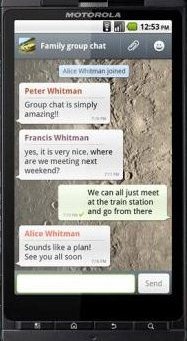
Here are some Features of WhatsApp:
-
It comes with worldwide chatting feature.
-
No hidden cost, you can send SMS and MMS Free anywhere to any friend from WhatsApp.
-
It does not include any International Charges for sending SMS.
-
You don’t need to add any Buddies as it imports contacts from your phonebook.
-
It has a feature of Offline Messages. Saves the messages when you are offline.
-
Comes with the Status update feature, wherein you can display a status of your choice.
-
It has much more features like exchange contacts, custom wallpapers, notification sounds, landscape mode, Email chat history etc.
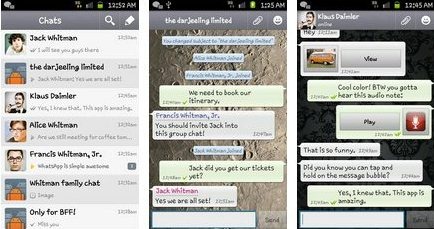
How to Download and Install “WhatsApp”:
- Just login to Android market, download depending on the operating system of the phone or just scan the below given QR Code:

- For Android Market just click on “Communication” tab in the market.
- In Communication tab click on “WhatsApp Messenger” Free.
- Last click on “Install”.
Your WhatsApp Messenger will be downloaded and installed automatically. Now it is ready to use and enjoy. Enjoy the taste of Free Chat.
