For a newcomer to office suits like Microsoft Office, or its free alternatives Libre Office and Open Office. It can be a little overwhelming to create even the most basic of chores like create diagrams, bar charts, flowcharts, pie charts and everything else that’s used in presentations. If you’re having problems with bulky interfaces that office suites have, then you should look into Diagram Ring, free diagram and charts creator, which is very easy to use.
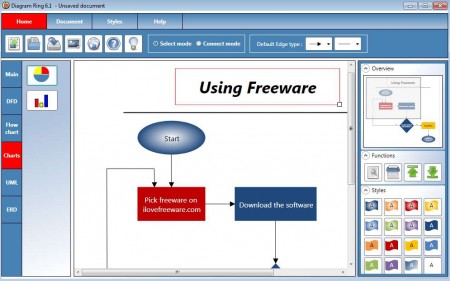
What does this create diagrams and charts software has to offer?
Diagram Ring comes packed with a lot of different options and features to help ease the creation of advanced diagrams, charts and more. Interface is very easy to follow and understand, everything is clearly laid out and handy. Every time that the Diagram Ring, free diagram creator and editor is started, Startup screen is presented where you are offered to either open up a new empty document on which to work on, or you can select one of the presets and edit it according to your needs.
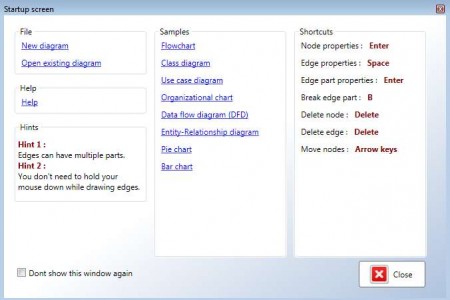
With Diagram Ring you can create the following:
- Bar charts
- Flow charts
- Class diagrams
- Pie charts
- Organization charts
- ERDs (Entry-relationship diagram)
- DFDs (Data flow diagram)
- Use case diagrams
and many more amazing graphics. You basically get everything that’s necessary to create charts of any kind for presentations at work, school or college.
How to create flowcharts with Diagram Ring?
Everything that you need in order to create previously mentioned info graphics is at your disposal. If you want to start from a blank slate, then select New diagram at the Startup screen. There are two main modes in which the program works. Select mode where you add different shapes onto the flowchart and the Connect mode where shapes that you’ve added can be connected with lines.
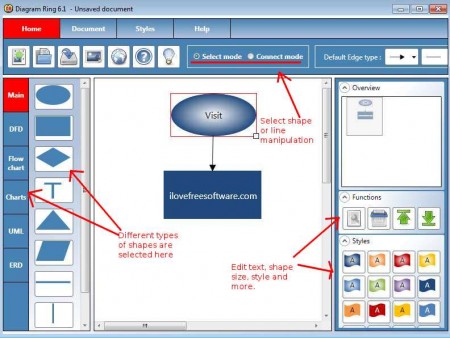
Text and size of shapes and objects that you’ve added to your flowchart can be adjusted on the right side, look under the Functions tab. Icon with a wrench hides these advanced options. Beneath Functions, you have the Styles tab which contains different colors and effects that can be used in the flowchart.
In what kind of formats can diagrams and flowcharts be saved?
Two different formats are offered by the Diagram Ring, charts and diagrams creator. DXR format would be the native format of Diagram Ring and great thing about it is that when documents are saved in it, you can continue to edit them later on if you wish to do so. DXR format won’t do us any good when we try to insert diagrams and flowcharts created with Diagram Ring into presentations, that’s why next to DXR, there’s also an option to export info graphics into JPG format, which can easily be inserted elsewhere.
Conclusion
Diagram Ring is a great alternative for all those who are unwilling to go through tonnes of options that more advanced office tools have in order to create diagrams and flowcharts. It’s very easy to use and understand, it will only take you minutes before you’ve created your first flowchart, so make sure to give Diagram Ring a try, it just might be the thing that you didn’t know you needed.
