• Home
  • Software Testing Service
  • About US
    • Privacy Policy
    • Disclosure
  • Write For Us
  • Submit Software
  • Contact Us
    • Subscribe
I Love Free Software
Best free software available all over the web. The free software categories include Windows Software, Social Networking Tools, and software installation videos.


  • Featured
  • Windows
  • Web Applications
  • App Store
  • Android
  • iPhone
  • iPad
  • Windows 8
  • Social Networking
  • Programming Tools

BCArchive – Compress and Encrypt Files Securely

By Anvin on May 8, 2010 | Sponsored Links

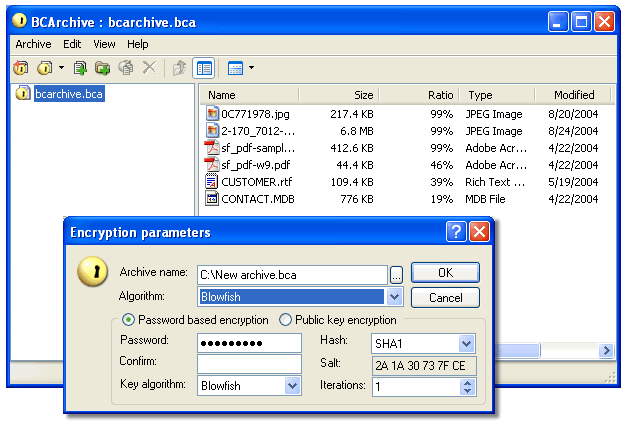
BCArchive is free data compression software that can compress files and folders and encrypt them in a single file. Password encryption and public key encryption are the two types of encryption found on BCArchive. It has a very simple user interface and is quite fast and secure.

Another similar software that we reviewed earlier is StorThing.

[Also Read: 10 Best Free Alternatives to Winzip and Winrar]

Sponsored Links

Why choose BCArchive?

There are many data compression software available online such as 7zip, then what sets the BCArchive application separate from others? The compressed files that you create with these applications do not provide a strong security when it is sent over the internet.

Even though BCArchive has a very simple user interface, but when it comes to sending the compressed data over the internet, it is very safe and secure.

If you want to back up some files and folders on your computer, you can add to the BCArchive and specify a password to encrypt it.  The same password can be entered to decrypt the archive.

Instead of typing the password to encrypt and decrypt data, BCArchive allows you to do the same by entering a public key (a secret key that is known to the sender and the recipient).

This strong built-in encryption means that you do not need to use a separate file encryption software to encrypt zipped files.

Here are the features of BCArchive:

  1. It is a free data compression application that provides powerful security to the created archives.
  2. You can compress files and folders into a single file and encrypt it by adding a password.
  3. You can also compress files and folders into a single file and encrypt it by using a secret key (also known as public key).
  4. It allows you to add many passwords to the existing archive.
  5. It also lets you add several public keys to the existing archive.
  6. The compressed and encrypted data can be turned into a self-extracting file. You can extract the file any time without installing the BCArchive.

BCArchive is a very good option to securely zip and encrypt your data.

Home Page: Click Here
Works With: Windows
Free / Paid: Free

Link to This Page:


You Might Also Like:

  1. Free Software To Compress Files
  2. PowerGDocs: Compress and Encrypt Google Docs Files
  3. Free Easy Encrypt – Password Protect Your Files Easily
  4. Encrypt Files and Folders with EncryptOnClick
  5. Crimson128: Encrypt Files From Right Click Menu

Be the first to know about Latest Free Software:

  • Join us on Facebook
  • Subscribe to our RSS Feed
  • Follow us on Twitter
  • Subscribe to Email Updates:

Posted in File Utilities, Security Software | Tagged file compression, file compression software, file encryption software, password protect, password protect files | Leave a response

Anvin

« Previous Next »

Featured Posts

  • 5 Free Snippet Managers To Manage Code Snippets
  • 5 Free Online Tools To Test Website In Different Resolutions
  • 5 Free Microsoft Access Alternatives
  • 5 Free IP Notifier Apps
  • 5 Online Mapping Websites
  • 5 Free Alternatives To iGoogle
  • 7 Websites To Download Windows 8 Themes
  • 5 Best Free Calculator Apps For Windows 8

Join More than 15,000 Followers!

Enter your Email Address
  • Submit Software
  • Software Testing Service
  • Write For Us
  • About Us
  • Privacy Policy
  • Disclosure
  • Contact Us

Link to Us:

Did we review your software here? Feel free to flaunt this badge on your website:

Free Software

Use this Code:

Copyright © 2013 I Love Free Software.

Powered by WordPress and Hybrid. New - H