TraderClock is a clock which every stock market trader should have installed on their computer. This clock not only does it display the current status of larger stock markets from all over the world, but it also shows what their current status is, open/closed, and how many points a certain stock has.
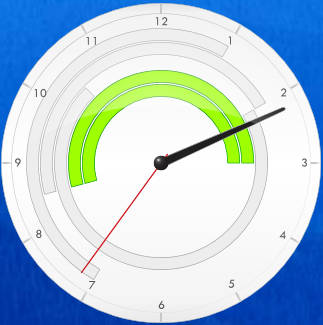
The clock itself has a very slick design and it will fit in nicely with the Windows 7 theme. What you see on the image above is the default style that TraderClock has, it comes with another dark style, if you are not fond of the white theme. Changing the styles is not the only thing which this clock has, there are a lot of other options which it has to offer, so let’s have a look at how we can configure TraderClock to better suit our needs.
Also check out Android stock market apps.
Basic configuration of TraderClock
Something that needs to be mentioned, before we start with the configuration talk are handy little warnings which will greet you when you first start TraderClock.
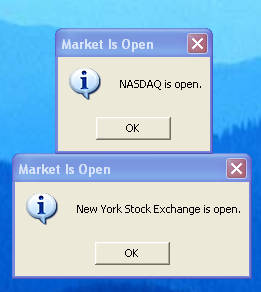
These are warnings which are notifying the user about stock markets being opened. You can configure these types of notifications by right clicking on the clock and selecting Settings, after doing that you will be presented with the following window:
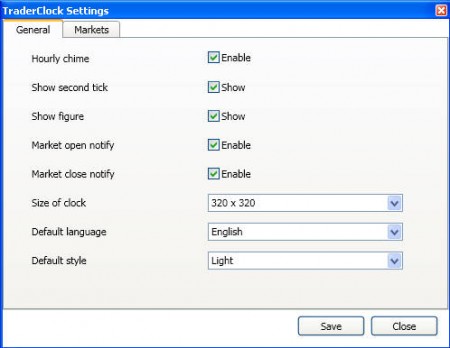
Options which we were talking about just a few moments ago, market open and close notifications are located just above the size of the clock. Changing the size of the clock is necessary because the default size of 320X320 might be a little bit too big for majority of screens, unless you have large monitors. Other settings that can be found here would be the language, show/hide second hand on the clock, and last, but not least would be the hourly chime options which will notify you each time an hour passes.
You can also check out We Seed, to learn how to trade in stock market.
The second tab in the Settings menu can be used in order to determine which stock markets are being followed.
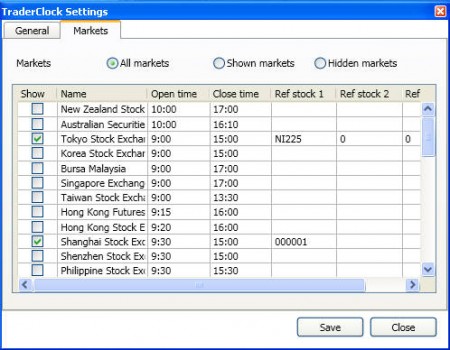
Program supports a lot of stock markets from all over the world, and the ones that you choose will be shown on the clock. Notice the green and white semi-rings around the clock on the first image above. Those are various stock markets which are being followed, and the ones which are currently opened are showed in green.
The Ref stock columns in this settings window can be used to determine which stocks on a given market you want to keep track of, this is what makes this little clock even more amazing. Simply write in these fields the market marking for the stock which you are keeping an eye on and when you hover over the clock, over the ring of that stock market a small pop up will appear with information about these three stocks that you’ve set to monitor.
Conclusion
TraderClock is a nice little plugin for your Windows desktop, and if you are stock market trader you can use it to add a bit of zest to your screen. It’s not too much of a burden on your computer resources, and you can use it even on older machines. Change the theme to suite your style and enjoy.
