Freegate is a proxy service that you can use in order to bypass filters and censorship, which are becoming more and more present on the Internet with each passing day. This proxy utility is very small and very simple to use, everything is practically automated and you can have a fully working proxy and protection that it offers in just a few clicks.
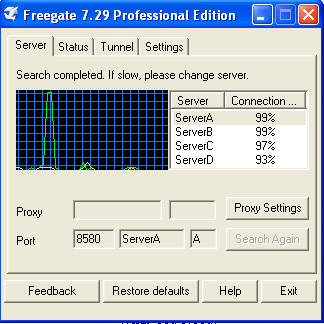
Internet censorship has been getting out of hand recently, even in the western world, but countries which are the worst when it comes to censorship would undoubtedly be China and some from the Middle East. There, people are not allowed access to harmless sites like Facebook, Twitter or MySpace, not to mention sites which are more important, like news sites where people can get the information about current events. In these types of situations Freegate can be very helpful and when you first start the program you’ll see that Freegate is aimed primarily at these countries.
Freegate configuration and use
This anonymizer doesn’t have to be installed, it runs right away after clicking the executable and after you run it for the first time you will see something like this:
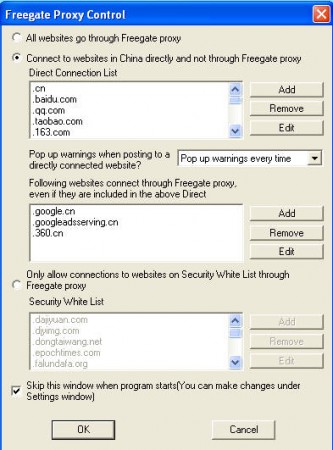
Here you can see what I was talking about the fact that when Freegate was created China was in the minds of the program creators. In this window, you can choose which websites can be accessed directly without the use of proxies and by default, Chinese websites, which are accessible in China are marked for direct access. This has been done in order to improve the browsing speed on these websites, but also to decrease a load of Freegate proxy servers, since the websites are working just fine when accessed directly from China. What’s more important for Freegate configuration is the window that you get after clicking on OK.

In this window, you are informed that Freegate automatically configured Internet Explorer to use Freegate proxy service for access to internet websites. Automatic proxy configuration for other browsers isn’t supported for the time being, unfortunately, and you’re gonna have to do it manually. Important info that you need in order to configure a proxy would be the local IP address and port number which Freegate is using:
127.0.0.1:8580
Firefox configuration is very easy to do, simply open up Network Settings by clicking on Tools >> Options >> Advanced >> Network and then selecting Settings. After clicking on Settings the following window will popup:
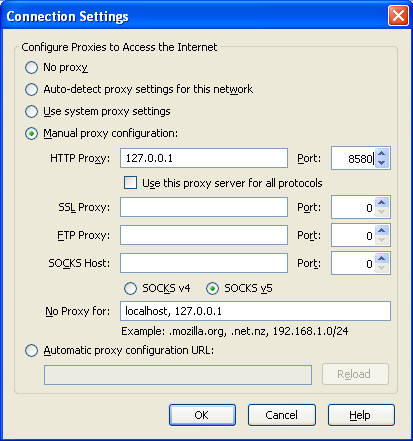
Fill in all the first fields, and you can do the other ones as well, but don’t expect miracles when it comes to SSL proxy protection, that’s something that you do not normally get with these types of free proxies, but fill in the fields anyway, just in case.
When you’re done with that, open up some random website that you would normally be blocked to, and it should be working now. Freegate proxies are very fast, and you will not feel any kind of major difficulties with speed. Try Freegate if you’re having problems with filters and censorship.
