LucidChart is free web application to create flowcharts, diagrams, graphs, and representations. The tool is easy to use and feature rich. The freeware is loaded with easy diagram tools, and collaborate flow charts, business process diagrams, sitemaps, wireframes, UML models, and more with just a few clicks.
Since visual representation is always better than text information and understanding is greatly influenced by diagrams. This freeware offers you large number of features and functionalities so that the diagrams are drawn with clarity and precision which are more communicable. You can also read Dynamic Draw, SlickPlan, DiagramDesigner and 5 Best Free Vector Graphics Editors for creating flowcharts, diagrams etc.
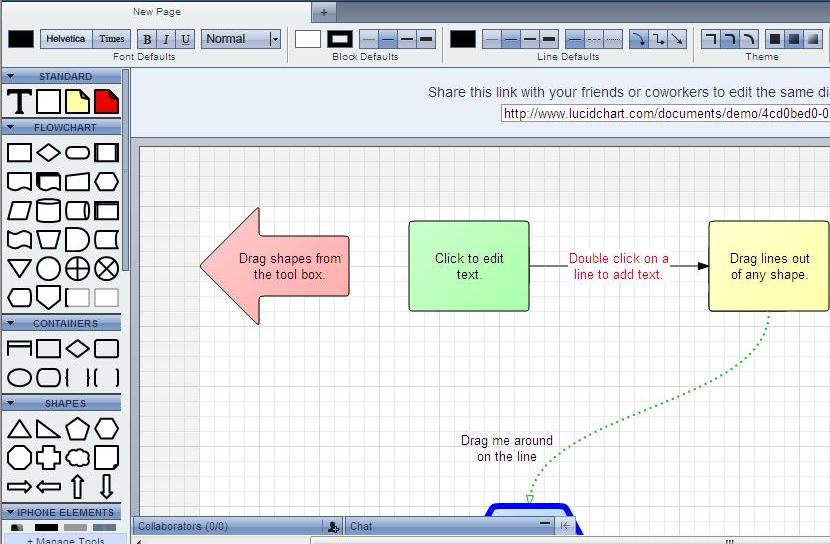
The application has huge library of shapes for different task of yours like business processing models, network theory and web development can be done hassle free. You can also share protocols with your team and clients by inviting them to review, edit, and comment. The protocol gives you flexibility of altering your business models and diagrams to improve project turnaround times.
Also, add image objects to your diagrams like logos, your company signature, or name of the company as watermark for identification. Moreover, your documents are stored with the freeware which is updated every hour to multiple data centers, so you do not have to worry about misplacing your files or dealing with hard drive failures.
The freeware uses latest web standards to create digital flowcharts and diagrams. Your users and you do not need any Flash plug-in, as LucidChart does not require any specific platform while you create interesting and useful diagrams for your job. LucidCharts supports web standards like HTML5, CSS3 and JavaScript, which is supported by most of the web browsers, thus it works in most of the browsers including Google’s Chrome. There is no need to download any flash plugin or something like that. You can start working directly.
The intuitive designing features lets you create diagrams with ease and very quickly. Use drag and drop and mouse clicks to prepare your diagrams and flowcharts. You also do not need to create shapes and objects. You will find variety of the objects within the application, which you can use, just choose your object, and drag them to your work sheet.
Draw a line by dragging out from the edge of one object and let go. You can also drop a new shape that is automatically connected. Connect and disconnect objects easily by moving lines between the shapes. Control the flow of ideas among the process and draw in any style you want.
Once you have finished drawing, your diagrams are ready for distribution and sharing. Also, get high quality print out using this application so that it becomes available to all. One-click publishing to a web page gives you a link you can send to anyone or publish in a wiki, corporate website, or personal blog. Interestingly, when you alter or modify anything in the charts and diagrams, the image is automatically updated for your viewers, so no need to worry about manually updating published copies. In addition, do real-time collaboration or avail the feature of reviewing history of the modifications done in the diagrams.
Free edition of LucidChart works for one user, 40 objects per model, and 5MB storage space.
