Spanning Undelete for Google Calendar is a free utility tool that lets you recover deleted Google Calendar events. Google Calendar unlike other Google products can only be able to undo the latest deletion. With Spanning Undelete, you can easily view and restore deleted events.
Features of Spanning Undelete for Google Calendar
- Events list which displays all deleted events.
- Simple and easy to use. All you need is to allow the application to access your Google Account to be able to use it.
- Recover deleted events easily in a few clicks.
How to use Spanning Undelete for Google Calendar
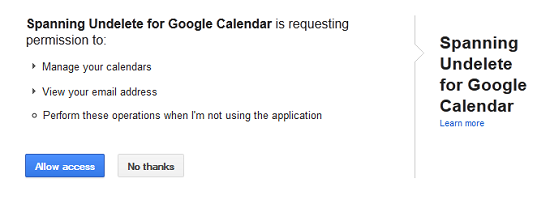
Installation can be done in two modes, one for developers and another for ordinary users. To run the application, you will be required to authorize the app to manage your calendar and use your data. Once all authorization is complete, the application opens a new interface. The web interface is very simple and well arranged. The interface displays a list of all deleted items. The list contains vital event information like names, date modified and dates they were scheduled to take place.
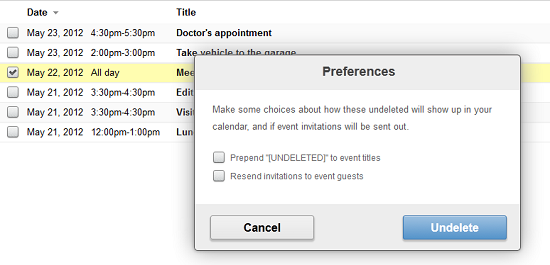
You can click on any item listed to obtain more information regarding the task. To restore deleted tasks, select an event by checking the checkbox appearing before it. You can select all events on the list by checking the box at the top of the list. If the Undelete button is not active, make sure you have checked at least one event, if active Click Undelete. The program prompts you to choose whether you want the word “undeleted” to be appended on restored events or whether you want to resend cancelled invites to participating parties by checking the respective options. Click Undelete to restore an event and Cancel to discard any changes. Changes are updated in a few seconds.
Opinion
The idea behind the Spanning Undelete for Google Calendar is great. The program offers users a simple and easy way to restore deleted items which is not possible on Google Calendar itself. The numerous authorizations required were quite alarming leaving you wondering if it’s really safe to trust the application with your calendar and Google Accounts data.
Verdict
With Spanning Undelete for Google Calendar you don’t have to be stressed about lost calendar events when you can easily restore them in a few minutes.
