Even though on the count of its name and the way that it’s used Privoxy might make some people think that this is a proxy software. In reality, Privoxy is ad blocking software, which has a very unique way of blocking ads. The most popular ways of blocking ads is by installing various browser plugins like AdBlocker. Privoxy mixes AdBlocker and proxy software in an effort to combat annoying ads with which users are bombarded everywhere they go these days.
In a way Privoxy is a proxy software, it does give you anonymity but anonymity against ad companies. Privoxy acts as proxy software, to set it up and start using it, you’re gonna have to configure your browser so that traffic goes through Privoxy, but the software doens’t change your IP address, just makes you invisible to online ads and not only them. According to the site with Privoxy you can also manage and contain tracking cookies that advertising companies like to place on our computers.
How to setup Privoxy for ad blocking
Setting up Privoxy is different from setting up AdBlocker and other ad blocking software. What you see on the image above is the default screen that will welcome you when you first start Privoxy. It doesn’t offer much information, there is only the giant white text area and the usual toolbar at the top. Unfortunately this will not change when you actually start using the program. When everything is setup, the giant white area should display logs of what the program is doing, which ads, what kind of content is blocked, that didn’t happen while we were testing the program. It remained empty despite of the fact that log displaying was activated, but the program worked just fine:
Before Privoxy:

After Privoxy:

To use Privoxy, you’re gonna have to configure your browser to channel traffic through Privoxy. In Firefox you can do this by clicking on Tools >> Options >> Advanced >> Network >> Settings. When you do that you will be presented with the following window:
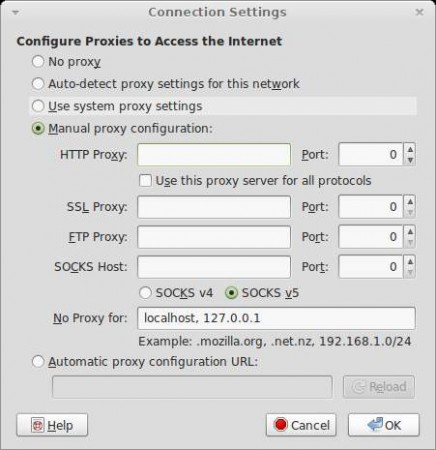
Fill in the HTTP and SSL proxy fields with this IP address and port:
Address: 127.0.0.1
Port: 8118
Don’t worry this is the local IP address and port that Privoxy monitors for ads. Once your browser is configured to use this address and port for traffic, then any ad which tries to ruin your browsing experience will be squished by Privoxy. Other browsers should be configured with the same settings and ads should be blocked in them too.
How to change options in Privoxy
Next to the fact that during our tests there were no logs being displayed by the program, another drawback that the program has is that the options have to be edited in files directly, there is no graphical user interface. Privoxy is rich with options and it can be configured in any way you want, but you’re gonna have to do it manually in files, by editing commands, instead of just marking checkboxes. Program does what it is intended to do, so if you are not afraid of getting your hands dirty with manual edits, Privoxy will do you just fine.
