Sunrise Seven is a free Windows 7 settings tweaker and optimizer which you can use to change pretty much everything about Windows 7 from performance and interface to security and maintenance. Website of this settings editor is in Polish, so you might have some problems finding additional info there, download link shouldn’t be a problem to find though. Application is very small which is very surprising once you see how many different tools it has to offer.
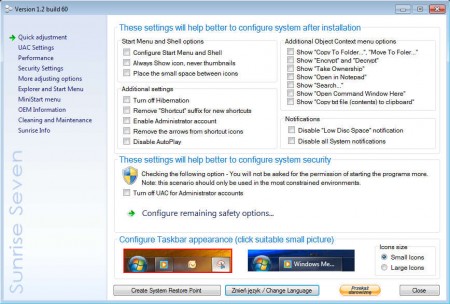
Default language of the application is English, don’t worry, language barrier will not be a problem when it comes to the program, only the website is problematic. As you can see from the image above, there’s a lot of different tools offered in Sunrise Seven, the 9 categories where various functions and tweaks are would be:
- Quick adjustment – Start Menu, Context Menu, Notifications
- UAC settings – user account control configuration
- Performance – turn off services, disable folder type discovery
- Security settings – block system access, manage updates
- Additional adjustments – computer icons, window transparency, desktop context menus
- Explorer and Start Menu – change start menu icon, options, width
- MiniStart menu – activate miniature start menu
- OEM information – edit computer OEM information
- Cleaning and Maintenance – automatic disk cleanup of unnecessary files
List of available tools and tweaks that you get is quite impressive, it’s a shame that the application only works on Windows 7, seeing how a lot of users are still using older versions of Windows. Let’s see what kind of goodies exactly are hidden in Sunrise Seven.
Similar software: Windows 7 Booster, XP Smoker, Advanced System Tweaker.
How to configure, tweak and speed up Windows 7 with Sunrise Seven
Best places to start configuring your system with the help of Sunrise would be the Quick adjustment menu, the first one in the left sidebar. There you are gonna find a combination of some of the most interesting tools that this free Windows 7 optimizer and system tweaker has to offer. However if you want to change something specific, for example if you want to improve the speed of your system, you’re gonna have to open up the Performance tab:
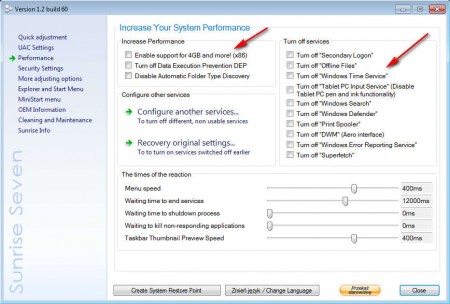
Notice on the right that you can easily disable unnecessary Windows services which are always causing systems to slow down. Another useful feature would be the ability to enable support for more than 4 GB of memory on 32bit systems, which are normally limited by the 3.2 GB memory barrier.
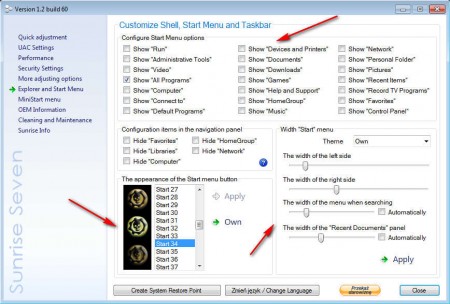
Those who are interested in eye candy, there’s something for them too. Start Menu entries and the icon can be changed easily, with just a few clicks. On the image above you can for example turn off Personal Folders from the menu, or you can change the width and the icon of the Start menu itself.
Conclusion
Sunrise Seven is packed with numerous useful system tweaking tools and it’s impossible to mention them all here. They all do as advertised, and they can all be applied easily to your Windows 7 system. For most of the tools offered you’ve probably never heard of, but they can help out a lot, download Sunrise Seven for free and give it a try.
