Update 2022: This software no longer exists except its source code. Try some other alternative now.
Task Scheduler Assistant is an addition to the default Windows Task Scheduler which adds to it the possibility to trigger certain tasks to files and folders. This little program installs as a service in Windows which will monitor files and folders. Keep track of changes which are being made to them and activate various tasks that the owner has designated in the Task Manager at the appropriate time or when they were modified in a certain way.
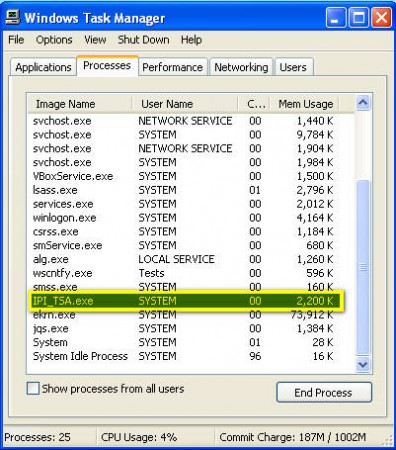
What you see on the image above is everything that you will see from Task Scheduler Assistant. When you install it, it will run automatically each time that the computer is started and you will only see this small process in your Task Manager. There is no graphical interface and all the necessary configurations that you need to do to the program is achieved through editing the configuration files. This might make some people not use this little task scheduler assistant, but don’t give up on it, because it’s relatively simple to configure it, if you know what you’re doing of course.
How to configure and use Task Scheduler Assistant
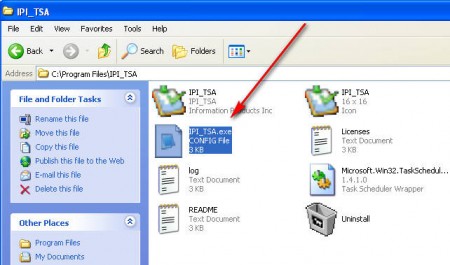
Once the Task Scheduler Assistant is installed you have to open up the main configuration file which is located in the installation directory and caries the same name that the application files does, IPI_TSA.exe.config, notice that the file is actually a config file. Look at the image so that you don’t confuse the config file with the executable file.
In that file you’re going to have to look for the following line:
C:\Users\b\IPI_TSA.xml
This is the line with which you can point the program to a different configuration file. Task Scheduler Assistant uses .xml file to configure the file and folder tasks. File location has to be entered between the value tags, the default location of the configuration file is:
C:\Users\b\IPI_TSA.xml
In this file you’re going to have to enter the task configurations. To fully understand how to manipulate with tasks you’re gonna have to open up the developer page and read the documentation. The thing that you need to know is how to use this Task Scheduler Assistant in order to make your life more easy.
What kind of uses does Task Scheduler Assistant have?
With Task Scheduler Assistant you can do a whole set of different tasks. For example you could receive data via FTA into a certain folder and then you can schedule TSA which will automatically start another program in order to import the data from this file inside a database. If you decide to do this, take note of the warning that’s given on the program’s documentation page about program execution postponement.
Even though you might need to read up a little bit on how to use it, with the advantages that you get it’s more than worth the effort. Task Scheduler Assistant is free, so you have nothing to lose if you try it out.
