Cubiez allows you to install your favorite smartphone apps to your computer, so that you can enjoy them while being on the desktop and away from your smartphone. Apps installed on your PC will be installed from Cubiez’s own servers, and the application is free for the time that it’s in testing, so if you want to run mobile apps on your computer now’s your chance to do so.

After installing Cubiez the main application is gonna be added to the Windows taskbar, and when you right click on the icon, the app selection browser that you can see on the image above is gonna be activated. The apps offered by Cubiez are not called apps, they are called Cubiez, and for the time being this free smarpthone app desktop emulator only comes with 6 apps which you can see above. Installing the apps is actually very easy, and they too will work the same way that the main application works, completely integrated into the Windows taskbar.
Similar software: BlueStacks.
Run smartphone apps on PC with Cubiez
Since porting apps used on smartphones to computers isn’t a very easy task, apps that are installed with the help of Cubiez are not technically speaking native apps installed directly from Google Store of iPhone Store. Each app used with Cubiez has undergone certain changes so that it can be installed and run with the help of PC. Install it by left clicking on the Cubiez icon in the taskbar and then by clicking on the Install button present next to each of the app names.
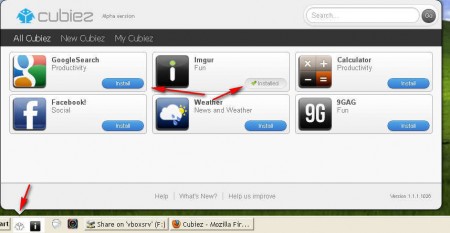
As you can see from the image above, an application has already been installed, and it can be seen in the taskbar right of the Cubiez icon. Clicking on that icon is gonna open up the app window, which is gonna be different from app to app, obviously.

On the image above we have the imgur app installed, which allows us to easily browse images shared on this popular image sharer. Left clicking on the image is gonna open it up in the browser, and notice on the top that there are tab selections for various different image groups. Each one of the apps offered by Cubiez works the same way, it has the same kind of taskbar nesting feature which is gonna switch PC into a smartphone very easily.
Conclusion
Next to the imgur app, there are 5 more website apps and regular apps that you can install and use with the help of Cubiez:
- Google Search
- Calculator
- 9GAG
- Weather
With time the number of application that Cubiez has to offer will grow, like we mentioned the application is still in alpha and it’s free while it’s in alpha. Hopefully the price will not be something too drastic so that everyone can enjoy smartphone apps on their computers easily. You could install Facebook app and have a nice little notifier which will keep you updated about the latest developments on your newsfeed, or anything else you can imagine, try Cubiez for free.
