ZoomFX is a free image editor tool which you can use to manipulate images in several different ways. It’s the perfect tool for everyone who’s interested in making changes to pictures without having to go through complicated menus and dealing with a lot of options, that similar image editors usually have. Photographs made with cameras need corrections sometimes, and you do that with ZoomFX very easily.
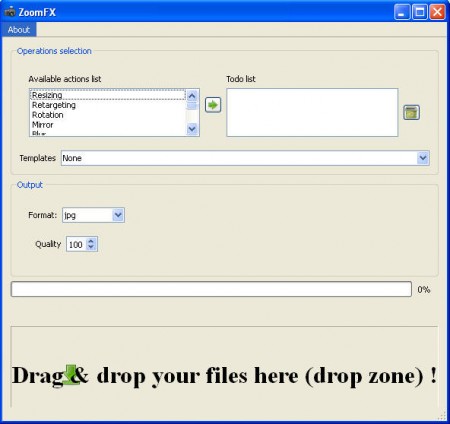
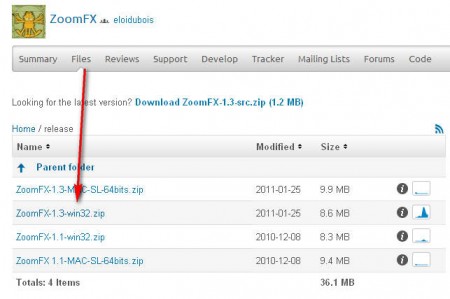
Default window of ZoomFX reveals all the image editing options that this tool has to offer. The list is pretty big, and there’s something for everyone in it. The thing that’s important to know is which file to download from the programs website in order for the program to run. The download link which is present on the main page of the ZoomFX sourceforge project page are source files which have to be compiled before use. Visit the download page and there you should see Windows installer, where you have .exe file that will start the program right away.
What kind of features does this free image editor have?
Like it was mentioned before, ZoomFX comes with a lot of image manipulation options and best part is that they are very simple to use. A short list of some of the things that ZoomFx does would be this:
- Resize
- Rotate
- Blur
- Sharpen
- Add text
- Upscaling
And many, many more. What each one of these does is pretty much self explanatory. Adding text can be used in order to add watermark on pictures. You can use sharpen tool in order to try and improve pictures which are blurry, but don’t expect miracles. Resizing pictures is very useful if you need to change their size for sending over emails and so on. A lot of useful things can be done with this little application, let’s see how exactly it works.
Using ZoomFX to edit images
Since ZoomFX has so many options, we can’t talk about them all, so we’re just gonna focus on the basics, how to resize images. You can resize images by left clicking on the Resize option on the left side of the window from the Available actions list, and clicking on the green arrow to put the action on the right side where the Todo list is located. Doing that will make the following window pop up:
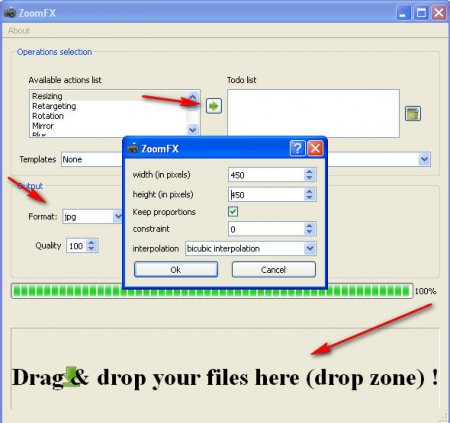
This is where you specify the desired changes that you want to see on the image which is being resized. Also take note of the Output settings in the background where you can adjust what kind of size the output images will have.
Once you’re done fiddling with settings, find the images that you want to convert and simply drag and drop them to the lower part of the window, where it’s written with the large letters to drag and drop ;).
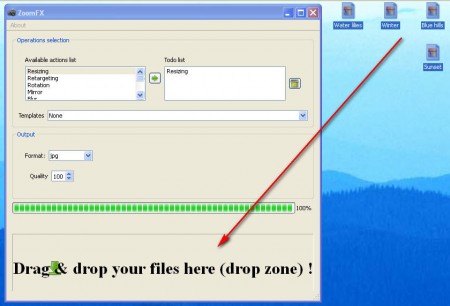
Once the images are placed there program will automatically start making the changes, and they will start appearing in the same folder where the old images were. Another thing that’s great about ZoomFX would be that it has settings templates, for example it has Imageshack template where it resizes and uploads images automatically, but it didn’t work for us, we didn’t get links after the upload. In any case ZoomFX is a great tool, with a lot of options, make sure to check it out.
