GlobeConvert is a free iPhone units converter app to convert currency and other units on iPhone, iPad and iPod touch. GlobeConvert is the perfect name given to the app, as this iPhone smart converter converts multiple units on iPhone.
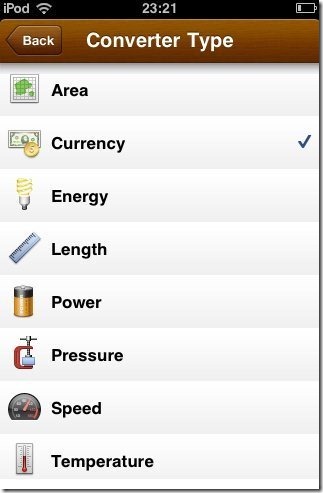
The app converts area, currency, energy, length, power, pressure, speed, temperature, time, volume and weight. The interface of the app is really easy to manage on iPhone and other iOS devices. The app even gives you the option to convert the unit or currency from one unit or country to other and vice-versa.

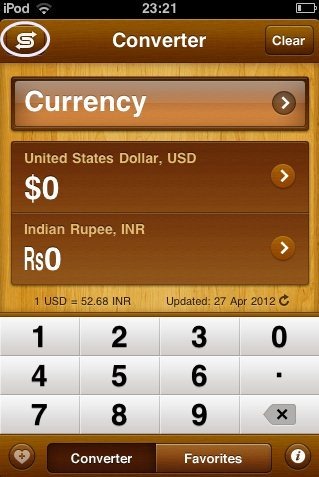
The good part of this iPhone units converter app which I liked the most is its results speed on iPhone. The app works really very fast on iPhone. Just enter the value and the app will convert the units or currency with the value as soon as entered in the app.
Also, the app comes up with inbuilt keyboard on iPhone. You can also add any converted currency page to your favorites on your iPhone to easily access that page at any point of time on your iPhone. Also, another good part of the app is that, the app works offline. It doesn’t need internet access to convert units and currency on iPhone.
You can also check out currency converter apps for iPad reviewed by us.
Key Features Of Currency And Units Converter App:
- The app converts currency and other units on iPhone, iPad, and iPod touch.
- The app comes up with area, currency, energy, length, power, pressure, speed, temperature, time, volume, and weight converter on iPhone.
- Simple and easy to use on any iOS device.
- Works very fast on iPhone, iPad and iPod touch.
- Vice-versa convert on your iPhone.

- Inbuilt keyboard in the app.
- The interface of the app looks great on iPhone.
Also, take a look Oanda currency converter app for Android reviewed by us.
How To Install GlobeConvert App On iPhone:
- Scan – QR Code below or search GlobeConvert in App Store.

- Install – Tap on install button to install the app.

The free Currency And Units Converter app will be automatically installed on your iPhone. Click here to download GlobeConvert app from App Store on your iPhone. Just convert your values by using this smart converter app on your iPhone. Convert anything even if you are offline.
