Best free software available all over the web. The free software categories include Windows Software, Social Networking Tools, and software installation videos.
By Ishan Bansal on October 27, 2009 | Sponsored Links
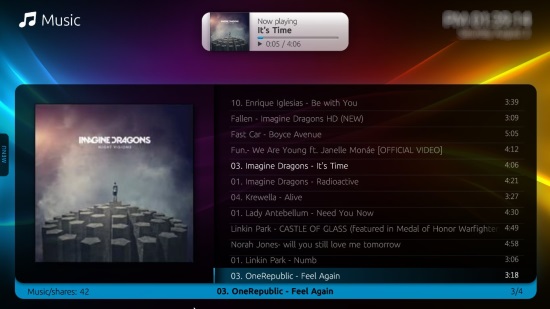
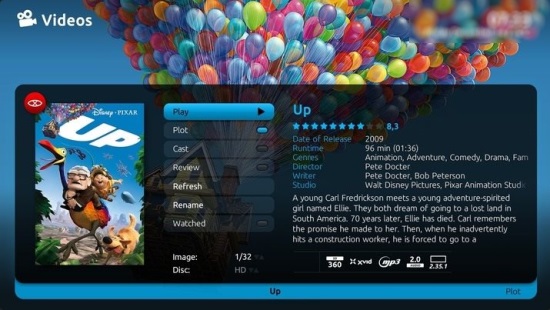
MediaPortal is a free and open source software that is an effective replacement for Windows Media Center. If you have a Windows edition that does not comes with Media Center, you can use MediaPortal to add Media Center functionality. MediaPortal allows you to listen to your favorite music and radio stations; watch and store your videos and DVDs; view, schedule and record live TV as a digital video recorder; and much, much more.
Earlier I had a laptop with Windows XP Media Center edition. However, my other laptop does not have that, and I really miss that feature. So, I tried to see if there is some other free software that can add Media Center like functionality to my Windows PC. I was reading Carol’s blog, and found that she had reviewed MediaPortal. This seems like the solution I was looking for. However, as I started reading features of MediaPortal, I was quite surprised with breadth of the functionality that MediaPortal provides.
MediaPortal provides a one stop solution for all your media needs. This free and open source software integrates all the features that you might need to have a fully media capable PC. On top of that, MediaPortal looks so beautiful that it is hard to believe that it is completely free.
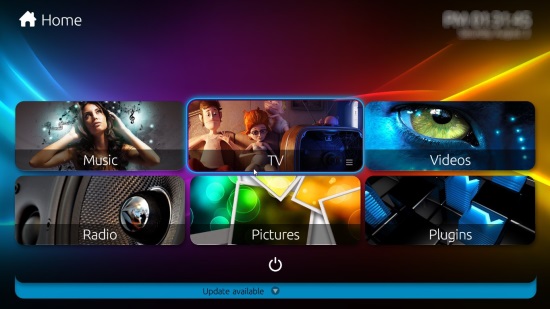
Here are some of the features of MediaPortal
(these features have been quoted from MediaPortal website):
MediaPortal MY TV Features:
Supports analog TV, DVB-C, DVB-T, DVB-S and ATSC
Support for multiple tuners
HDTV and AC3 support
Record, watch, and timeshift Live TV
Timeshifting,Watch, Pause, Rewind, FF, RW Live TV
Advanced recording scheduler:
- Record once
- Record now
- Daily o Weekly
- Weekdays (Mon-Fri)
- Every time a program appears on this TV channel
Advanced recording management:
- Handle conflicts
- Set recording priorities
- Quality settings / recording
- Transcode to WMD, XVID or MPG
- Diskmanagement auto deletes old and/or watched recordings
TVGuide:
- Grab DVB-EPG & MHW-EPG directly for DVB
- Supports XMLTV
- Colors for genres
TV Guide search
TV Channel grouping
Supports over > 10000 channels
Auto channel tuning
Normal OSD (On Screen Display during movies/tv)
Special ZAP OSD (Shows description of what is playing currently on TV)
Support for Teletext
Standby control to put your HTPC sleeping. It will awake when there a recording needs to start
MY VIDEO / MYDVD
Play any movie your PC has a codec for (divx, mpeg, matroska,…)
All your movies will be stored in MediaPortal’s video database
View your movies by actors, genres, year, title
Sort your movies by actors, genres, year, rating
Automatically retrieves video art & info from IMDB
Stacking/unstacking if your movie consists of multiple files
Internal DVD player with menu’s (you can also use an external DVD player)
Zoom in/out, rotate pictures (rotation is remembered next time)
Pause, previous/next picture
Delete picture(s)
Background music, either songs from my music, or radio from my radio
Auto thumbnail generation
Sort in Name, Date, Size
View in List, Icon or Big Icon display
Ken Burns effect slideshow
Filmstrip view
MY MUSIC
View your music by artists, albums, genres, top100 or plain songs
Sort your music in many ways like tracks, genre, filesize, artists, album,…
Use visualisations from Windows ?Media Player 10
Load, create & save playlists (.m3u, .pls, .b4u)
Automaticlly gets album art & info for all your albums
Automaticlly gets artist art & info for all your artists
View by list, icons, and big icons
Shuffle, repeat, FF, RW, pause,…
Music ratings
Favorites
Party shuffle mode
Search music for specific songs
Display all your favorite songs in one screen
Utilize Winamp, Foobar or iTunes plugins for music playback
MY RADIO
Listen to your favorite radio stations (FM, DVB or internet stream)
Auto tuning (FM)
Logo’s for each radio station (manual process)
Supply a friendly name for each radio station
Internet radio station streaming (ASX or Shoutcast)
Support for external radio tuner applications
Auto start listening to your selected radio station when MediaPortal starts
MY WEATHER
Show the latest weather information
Support for multiple cities
Current temperature, 3 Day Forecast
Temperature (in degrees C/F)
UV Index, Humity (%), Wind (mph/kph), etc
Support for live images from internet, like:
- Satellite images
- Temperature images
- UV Index images
- Winds images
- Humidity images
- Precipitation images
MORE FEATURES!
Launching external programs like:
- Games
- Emulators
- Email application
- Internet Browser
- IRC client
Burner let’s you burn all type of files and folders directly to CD-DVD from within the MediaPortal interface
Showing RSS news feeds
Read and send mail within MediaPortal
Monitor computer hardware:
- CPU temperature
- Motherboard Temperature
- Hard disk Temperature
- Used Memory
- Used Virtual Memory
Allow the PC automatically go to standby/hibernation and wakes it when there is a scheduled recording! Just like a real VCR!
Has different alarm features
You can even play included games like Tetris or Sudoku!
GENERAL
Create your own skins, or choose one of the available skins!
MediaPortal can easily be extended with extra plugins
You decide which keys you want to use for which actions
Internal support for several remote control (streamzap, MCE, redeye, winlirc, hauppauge, FireDTV)
Windowed and fullscreen support
As you would have noticed, feature list of MediaPortal is quite long, and broad. MediaPortal is plugin based, so new features are constantly being made available and you can easily add them to your MediaPortal. If you do not have Media Center in your PC, you need to try MediaPortal. This will replace all the media players that you might have in your PC.
MediaPortal is a free and open source software that is an effective replacement for Windows Media Center. If you have a Windows edition that does not comes with Media Center, you can use MediaPortal to add Media Center functionality. MediaPortal allows you to listen to your favorite music and radio stations; watch and store your videos and DVDs; view, schedule and record live TV as a digital video recorder; and much, much more. On top of that, MediaPortal looks so beautiful that it is hard to believe that it is completely free.
Sponsored Links
Earlier I had a laptop with Windows XP Media Center edition. However, my other laptop does not have that, and I really miss that feature. So, I tried to see if there is some other free software that can add Media Center like functionality to my Windows PC. I was reading Carol’s blog, and found that she had reviewed MediaPortal. This seems like the solution I was looking for. However, as I started reading features of MediaPortal, I was quite surprised with breadth of the functionality that MediaPortal provides.
MediaPortal provides a one stop solution for all your media needs. This free and open source software integrates all the features that you might need to have a fully media capable PC.
Automatically retrieves video art & info from IMDB
Stacking/unstacking if your movie consists of multiple files
View your movies by actors, genres, year, title
Sort your movies by actors, genres, year, rating
Resume from playback on next play
MY PICTURES
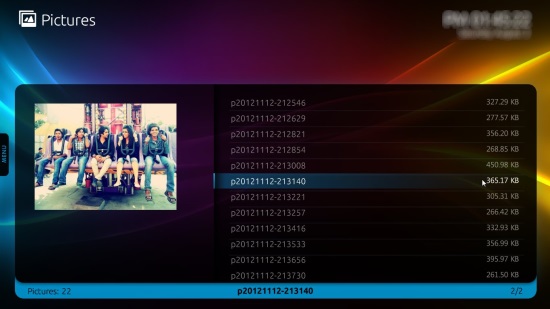
Watch your pictures/photos
Zoom in/out, rotate pictures
Pause, previous/next picture
Slideshow support with nice transitions
Delete picture(s)
Auto thumbnail generation
Sort in Name, Date, Size
Background music, either songs from my music, or radio from my radio
Ken Burns effect slideshow
Filmstrip view
View in List, Icon or Big Icon display
MY MUSIC
View your music by artists, albums, genres, top100 or plain songs
Sort your music in many ways like tracks, genre, filesize, artists, album,…
Use visualisations from Windows ?Media Player 10
Load, create & save playlists (.m3u, .pls, .b4u)
Automaticlly gets album art & info for all your albums
Shuffle, repeat, FF, RW, pause,…
Music ratings
Automaticlly gets artist art & info for all your artists
View by list, icons, and big icons
Party shuffle mode
Search music for specific songs
MY RADIO
Listen to your favorite radio stations (FM, DVB or internet stream)
Auto tuning (FM)
Supply a friendly name for each radio station
Internet radio station streaming (ASX or Shoutcast)
Logo’s for each radio station (manual process)
Auto start listening to your selected radio station when MediaPortal starts
Support for external radio tuner applications
MY WEATHER
Show the latest weather information
Support for multiple cities
Current temperature, 3 Day Forecast
MORE FEATURES!
Launching external programs like:
Games
Emulators
Email application
Internet Browser
IRC client
Burner let’s you burn all type of files and folders directly to CD-DVD from within the MediaPortal interface
Showing RSS news feeds
Read and send mail within MediaPortal
Monitor computer hardware:
CPU temperature
Motherboard Temperature
Hard disk Temperature
Used Memory
Used Virtual Memory
Allow the PC automatically go to standby/hibernation and wakes it when there is a scheduled recording! Just like a real VCR!
Has different alarm features
You can even play included games like Tetris or Sudoku!
Create your own skins, or choose one of the available skins!
Internal support for several remote control (streamzap, MCE, redeye, winlirc, hauppauge, FireDTV)
Windowed and fullscreen support
As you would have noticed, feature list of MediaPortal is quite long, and broad. MediaPortal is plugin based, so new features are constantly being made available and you can easily add them to your MediaPortal. If you do not have Media Center in your PC, you need to try MediaPortal. This will replace all the media players that you might have in your PC. If you do not want this MediaPortal, you can try RealPlayer, or MediaMonkey.
Home Page: Click Here Works With: Windows Free / Paid: Free
Pingback: Watch YouTube Videos in Media Center: MacroTube Plugin | I Love Free Software