Directory Monitor is a free software that lets you monitor directories and network folders on your system for changes. It continuously monitors the target directories for file modifications, deletions, renaming, or any change in file properties and alerts you in real-time through balloon notifications. It also maintains a log of all the changes in the directory for later reference. Plus offers extended functionality through plugins.
Apart from that, it offers some advanced features which furthermore adds flexibility to the software. It’s support for adding filters for particular directories, option to include or exclude subdirectories for monitoring, and executing a script of application on occurrence of a certain event are worth noticing.
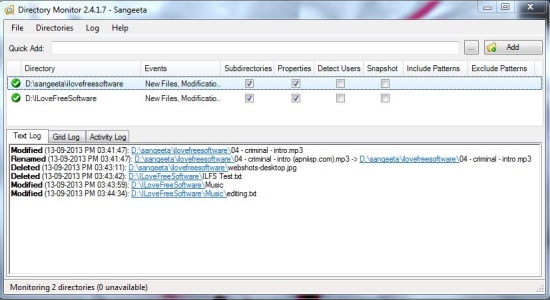
The tool can be downloaded free of cost using the link given at the end of this article. The good part is that it’s quite handy and easy to use. So you won’t be facing any problems while using this free directory monitor. Moreover, it integrates in your system tray, so you can continue with your work, leaving the monitoring process running in background.
Monitor Directory Changes with Directory Monitor:
After installing the app in your system, you will first have to specify which directories or network shares you want to monitor. The main interface of the program contains an Add button (as shown in the above screenshot) that opens a new window (screenshot below) wherein you can add the requisite directory or folder. Apart from browsing and adding folders, this window also lets you specify the events and options to view notifications (such as new file creation, file modification, deletion, and renaming). Plus, there are other tabs that lets you change the properties of log file, specify application or script to be executed when an event occurs, choose audio sound for notification, and enable emailing to send reports.
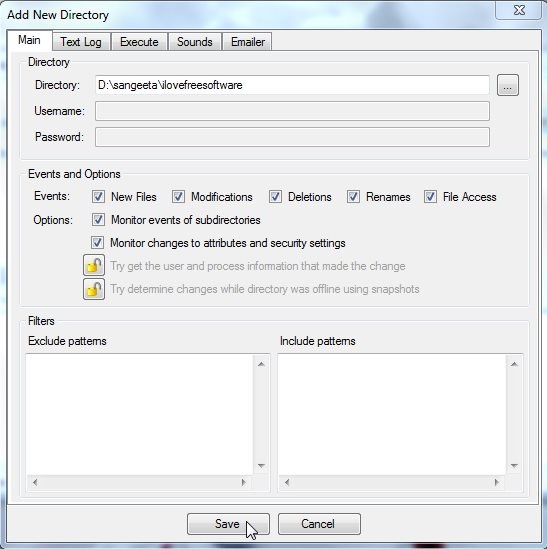
Once you done with the settings and configurations, you can click on Save and likewise add as many directories to the software as you want. Once everything is done, you can close the main window. Note, even after closing the app, it will keep running in the system tray area, silently monitoring the target directories.
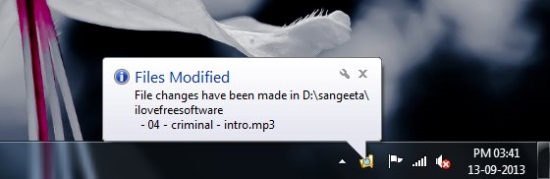
From this point onwards, whenever a change occurs in any of the file in the target directories, it will display a desktop notification and make a corresponding entry in its log.
If you want to disable copying, deleting, and renaming of files and folders on your system, you may check out Prevent.
Key Features of Directory Monitor:
- Free software to monitor and detect changes in a directory or network share.
- Alerts for file change, modification, deletion, file attribute-changes.
- Displays balloon notifications in real-time.
- Option to include sub-directories.
- Support for filters.
- option to run script or application on triggered event.
- Maintains log, saves it as text file.
- Import/export feature.
- Emailing feature.
- Sound alerts.
- Pause/resume monitoring.
- Plugin support.
- Easy to use.
Also check out free file manager for Windows.
The Final Verdict:
Directory Monitor is completely free, and a nice application to keep track of changes to your directories. Try it and monitor directory changes in background.
