Trend Micro’s Fake Antivirus (FakeAV for short) Tool is a security utility that you can use if you’ve become infected with one of the hundreds of fake antivirus programs that exist out there. People who are not very knowledgeable about computers often fall prey to malicious individuals who create fake antivirus software which then infects their victims or scares them out their money for fake detection fixes, or both, which is more common. With Trend Micro’s Fake Antivirus Tool, you can combat such infections and clean your PC from malware.

Another term under which fake antivirus programs are known would be rouge AV, and they can be very hard to get rid of. The usual behavior of a fake rouge antivirus program would be:
- Unwanted installation, either via autorun or via browser attack.
- Shutting down the actual AV that is installed.
- Blocking access to system areas where we might delete it.
- Constant infection notifications, fake ones or even those caused by the AV itself.
- Payment for the full version of the software so that viruses can be deleted.
As you can see from the image above, from the default interface of Fake Antivirus Remover, using the program is very easy, and it doesn’t take long for the program to find problems and fix them. That’s not the problem, the problem would be to actually run it on a machine where fake AV has taken control, that’s why there are several different ways to run Fake Antivirus Remover on a PC.
Similar software: Norton Power, Rootkit Revealer
Delete rouge antivirus with Fake Antivirus Remover
Now before you start thinking that this antivirus remover is actually a rouge antivirus, you can be rest assured, it’s not. Trend Micro is a famous security company which can be trusted. To go around the various blockages that fake security programs put on the computer, once they’re nested, Fake Antivirus can be downloaded with 4 different run methods:
- svchost.exe – to fool the fake AV into thinking that it’s not here to help, that it’s just a system process
- svchhost.exe.zip – if you can’t run archives on the infected machine
- FakeAntivirusRemoval.exe – if there are no blockages by the Fake AV
- FakeAntivirusRemoval.exe.zip, if zip works, but .exe does not
Once you have downloaded the method of starting this fake antivirus removal tool and ran it, you’ll be presented with the screen that you see above, by selecting the scan all processes:
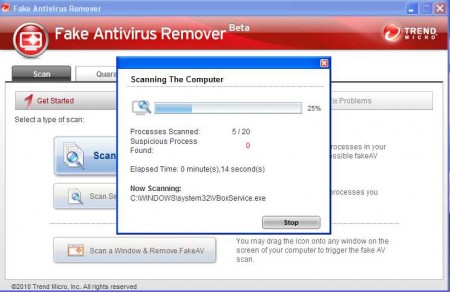
The program will search through the list of currently active processes and look for any signs of rouge AV programs. Upon detection, the located files can be terminated, quarantined or deleted. Single process scan is also possible, for when you suspect that a process could be bad, but can’t be sure.
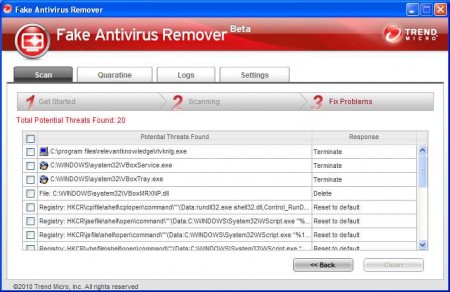
There is also an option to start a scan by dragging and dropping the scan icon, it’s the button that’s located all the way down at the bottom of the program window. This is again for those situation when fake AV blocks normal starting options of just pressing the Start or Go button. Even though it’s beta, Trend Micro’s Fake AV Remover is very useful, use it if you have problems with fake antivirus infection.
