Windows Memory Diagnostic is a free software to thoroughly scan your memory for any errors with your RAM module. Windows Memory Diagnostic creates a startup disk, and you can use that startup disk to scan memory of your computer.
Once you download Windows Memory Diagnostic, you can double click on the exe file to run it. You do not need to install anything, and can directly run the downloaded exe file.
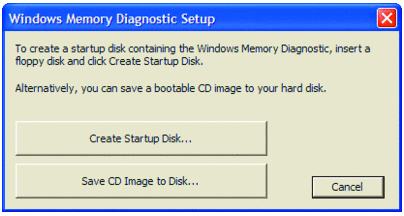
After running, Windows Memory Diagnostic will give you an option to create either an ISO file, or a bootable floppy disc. I haven’t come across any computer that still uses Floppy drives, so I will go with ISO option.
Selection that option creates ISO file of Windows Memory Diagnostic on your hard disk. You then need to burn that ISO file to a CD to create a bootable disc. You can use a free CD/DVD burner to burn ISO file to disc. You can also create a bootable USB stick instead by using UNetbootin.
Once you have burned the disc/USB drive, just start your computer with that. Windows Memory Diagnostic will immediately get to work.
Windows Memory Diagnostic comes with 3 memory diagnostic options:
Basic Option: This option includes 2 separate memory diagnostic tests, and completes pretty quickly. However, it is recommended to go with Standard or Enhanced tests (mentioned below), instead of Basic option.
Standard Option: In Standard option Windows Memory Diagnostic runs 6 different diagnostic tests on your memory. This is more thorough than Basic option, and the recommended option. If Standard option does not shows any error, but you sense some error in your RAM, you might want to proceed with Enhanced option.
Enhanced Option: Enhanced option of Windows Memory Diagnostic tool runs 11 different diagnostic tests. This is the most thorough option to check your memory for any error, but it also takes quite some time. In fact, it is recommended that you let this memory test running overnight.
Once Windows Memory Diagnostic completes test, it will show you detailed error information. It might even be able to point out if some specific memory module has an error, so you can replace only that memory module. If you want to scab your hard disk for errors, you can use HDDScan.
Windows Memory Diagnostic is a really good option to scan your RAM for any errors. It supports up to 4 GB of RAM only.
