GizmoTrim is a free software to remove duplicate songs from iTunes. GizmoTrim scans your iTunes library, and deletes duplicates from iTunes. This helps you in saving space on your computer, as well as your iPod, iPhone, and other Apple devices.

GizmoTrim is quite small in size. It downloads as a zip file that is less than 1MB in size, and comes from makers of GizmoRip. As you launch GizmoTrim, it will automatically launch your iTunes library. Then you can easily use this simple software to find and remove duplicate songs from your iTunes library.
You may also use meta-iPod to clean your iTunes library.
Easily Remove Duplicate Songs from your iTunes library using GizmoTrim:
GizmoTrim can easily remove all the duplicate tracks from your iTunes library, and save extra space on your computer, as well as your iPod. Follow some very easy steps to remove duplicates from your iTunes.
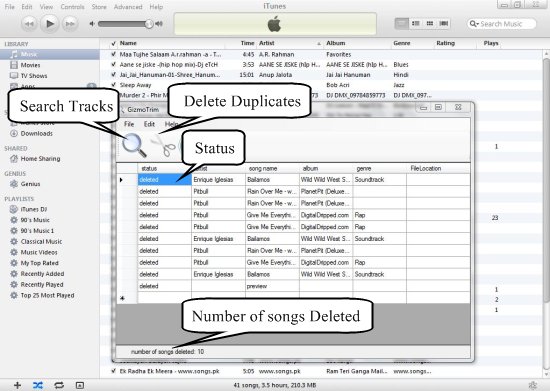
- Search Tracks: To remove duplicates songs or videos from your iTunes library, simply launch the application and click on the “Search Tracks” button. GizmoTrim will scan your iTunes library and find out all the duplicate music files.
- Delete Duplicates: You can then, press the “Delete Duplicates” button to remove duplicate audio and video files from your iTunes library.
Also try other free duplicate file finder.
Some Key Features of GizmoTrim:
- Quick Scan: GizmoTrim quickly scans your iTunes library and shows the results immediately.
- Simple User Interface: It has a very simple user interface with few commands.
- Shows Status Report: It shows the status of the duplicate music files, and those which are deleted, has a “Deleted” status listed in front of them.
- Shows Total Number of Duplicate files: It shows the total number of duplicate songs and video files that are present in your iTunes library. This way, you can easily find how many songs in total, have been deleted from your iTunes library.
The Final Verdict:
GizmoTrim is a small and easy to use utility to quickly remove all the duplicate tracks from your iTunes library. It helps in reducing the extra space used by these unwanted duplicate files.
