• Home
  • Software Testing Service
  • About US
    • Privacy Policy
    • Disclosure
  • Write For Us
  • Submit Software
  • Contact Us
    • Subscribe
I Love Free Software
Best free software available all over the web. The free software categories include Windows Software, Social Networking Tools, and software installation videos.


  • Featured
  • Windows
  • Web Applications
  • App Store
  • Android
  • iPhone
  • iPad
  • Windows 8
  • Social Networking
  • Programming Tools

FAST: Sync Data and Get Back Previous Versions of Files

By Anvin on April 24, 2010 | Sponsored Links

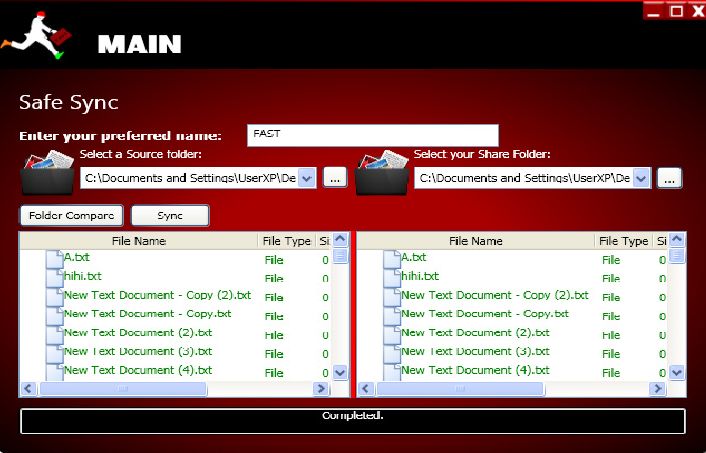
FAST (File-Versioning and Syncing Tool) is a free synchronization application for syncing files and folders of various locations. It also lets you reverse the changes that are made to the files due to human error.

The free file versioning software will help in reversing the changes that are made to the files which are otherwise not reversible. Hence, file versioning will help you in getting back any versions of the file that you created previously by few clicks.

Some other file sync tools that we reviewed earlier are: File Synchronizer, Microsoft Sync, PureSync, SyncToy, and Dropbox.

Sponsored Links

FAST is really a handy application that should be used by all. It easily lets you synchronize data between two computers through an intermediary storage such as a hard disk. During the synchronization process, FAST automatically creates copies of the earlier version of the files in the backup folder.

Another striking feature of this application is file versioning of any file. When we edit any document, we often make changes to it and when we close the file the changes are saved. Once saved and closed, we cannot get back the changes that we made before we closed the file. File versioning will let you access the previous versions of any file.

Here are some of the features of FAST:

  1. It is a free file versioning and data synchronization application.
  2. You can synchronize data between two locations simultaneously.
  3. Quick Sync feature lets you quickly synchronize data between two locations without file-versioning.
  4. While synchronizing data, you can restore folder versions, get back file versions and also lets you go back to a specific time in the past to restore the folder.
  5. File versioning lets you access the previously versions of the files at a specific location.
  6. Folder versioning lets you access the previously versions of the folders at a specific location.
  7. A log is created of things that took happened during the synchronization process.
  8. It lets you compare folders between two computers and shows the files and folders in a tree-like format.
Home Page: Click Here
Works With: Windows
Free / Paid: Free

Link to This Page:


You Might Also Like:

  1. File Synchronizer: Synchronize Data between Folders
  2. Download Synchredible: Free Software to Sync Files Folders
  3. Synchronize Modified Files, and Create Incremental Backups to Revert to Old Version: Sync Last Files Free
  4. IDriveSync: Sync Files Across PC and Mac
  5. Microsoft Sync – Keep Files in Sync Across Computers

Be the first to know about Latest Free Software:

  • Join us on Facebook
  • Subscribe to our RSS Feed
  • Follow us on Twitter
  • Subscribe to Email Updates:

Posted in File Utilities, Windows | Tagged file synchronizer, sync, sync data, sync folders, synchronize | 1 Response

Anvin

  • Pingback: Download Synchredible: Free Software to Sync Files Folders | I Love Free Software

« Previous Next »

Featured Posts

  • Top 7 Free Launchers for Android
  • 5 Free Snippet Managers To Manage Code Snippets
  • 5 Free Online Tools To Test Website In Different Resolutions
  • 5 Free Microsoft Access Alternatives
  • 5 Free IP Notifier Apps
  • 5 Online Mapping Websites
  • 5 Free Alternatives To iGoogle
  • 7 Websites To Download Windows 8 Themes

Join More than 15,000 Followers!

Enter your Email Address
  • Submit Software
  • Software Testing Service
  • Write For Us
  • About Us
  • Privacy Policy
  • Disclosure
  • Contact Us

Link to Us:

Did we review your software here? Feel free to flaunt this badge on your website:

Free Software

Use this Code:

Copyright © 2013 I Love Free Software.

Powered by WordPress and Hybrid. New - H