• Home
  • Software Testing Service
  • About US
    • Privacy Policy
    • Disclosure
  • Write For Us
  • Submit Software
  • Contact Us
    • Subscribe
I Love Free Software
Best free software available all over the web. The free software categories include Windows Software, Social Networking Tools, and software installation videos.


  • Featured
  • Windows
  • Web Applications
  • App Store
  • Android
  • iPhone
  • iPad
  • Windows 8
  • Social Networking
  • Programming Tools

DriveImage: Create a Copy of Entire Drive or Partitions

By Ishan Bansal on October 24, 2009 | Sponsored Links

DriveImage XML is a free software to create a copy of your entir hard disk, or selected partitions of your drive. DriveImage XML can even backup RAID drives, if they are hardware RAID. DriveImage XML also lets you restore the data back from your backup in case your system crashes.
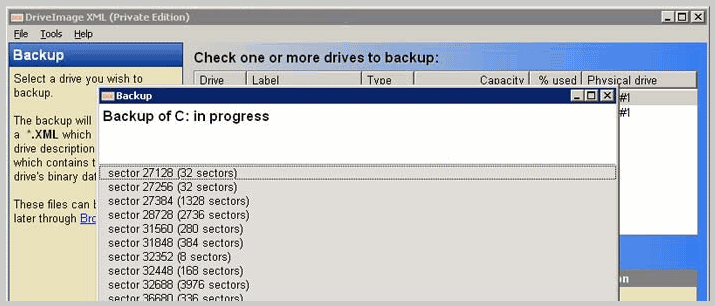
DriveImage XML has following features:
You can backup your running drives.
The backup files are stored as XML files.
You can choose to create entire backup in one XML file, or split across multiple XML files.
The backup can be stored on an external hard disk, or a different partition on the same disk.
Two different compression levels offered to compress the data while being backed up.
You can select the drives or partitions that you want to backup.
DriveImage XML lets you restore data from your backup in case of system crash.
DriveImage XML lets you browse the files in your backup, and restore selected files.
You can schedule the backups.
DriveImage XML is completely free for Personal use.
I found following shortcomings in DriveImage XML:
You cannot directly burn the archives to CD/DVD. You need to first store them on a disk.
The size of disk where you are trying to store backup should be at least same size as the disk or partition being backed up, even if size of data itself is pretty small.
DriveImage XML is a fast and easy to use software to backup your entire disk. I had reviewed a similar software earlier, called DriveBackup, which I found to be more feature rich as compared to DriveImage XML.

DriveImage XML is a free software to create a copy of your entir hard disk, or selected partitions of your drive. DriveImage XML can even backup RAID drives, if they are hardware RAID. DriveImage XML also lets you restore the data back from your backup in case your system crashes.

Download DriveImage XML
Sponsored Links

DriveImage XML has following features:

  • You can backup your drives even while they are running.
  • The backup files are stored as XML files.
  • You can choose to create entire backup in one XML file, or split across multiple XML files.
  • The backup can be stored on an external hard disk, or a different partition on the same disk.
  • Two different compression levels offered to compress the data while being backed up.
  • You can select the drives or partitions that you want to backup.
  • DriveImage XML lets you restore data from your backup in case of system crash.
  • DriveImage XML lets you browse the files in your backup, and restore selected files.
  • You can schedule the backups.

DriveImage XML is completely free for Personal use.

I found following shortcomings in DriveImage XML:

  • You cannot directly burn the archives to CD/DVD. You need to first store them on a disk.
  • The size of disk where you are trying to store backup should be at least same size as the disk or partition being backed up, even if size of data itself is pretty small.

DriveImage XML is a fast and easy to use software to backup your entire disk. I had reviewed a similar software earlier, called DriveBackup, which I found to be more feature rich as compared to DriveImage XML.

If you are just looking to backup selected files, easiest way is by using some online backup service, like SkyDrive that gives you 25GB of free online storage. Or, you can use software like SpiderOak that keeps data in sync between 2 computers. If you want to backup just drivers, you can try DriverBackup Free Software.

Home Page: Click Here
Works With: Windows XP, Windows Server 2003, Vista and Windows 7
Free / Paid: Free

Link to This Page:


You Might Also Like:

  1. Create, Delete, Move, Copy Partitions: MiniTool Partition Wizard Free
  2. Free Software to Recover Lost or Deleted Partitions: Partition Find and Mount
  3. Create Encrypted Partitions with TrueCrypt
  4. Tera Copy: Free Software to Copy Files Fast
  5. Free Disk Partition Software: Wondershare Disk Manager

Be the first to know about Latest Free Software:

  • Join us on Facebook
  • Subscribe to our RSS Feed
  • Follow us on Twitter
  • Subscribe to Email Updates:

Posted in File Utilities, System Utilities, Windows | Tagged backup drive, backup entire drive, backup partition, driveimage, DriveImage XML | 1 Response

Ishan Bansal

  • Pingback: Fastest Free Disk Imaging Software: Macrium Reflect | I Love Free Software

« Previous Next »

Featured Posts

  • Top 7 Free Launchers for Android
  • 5 Free Snippet Managers To Manage Code Snippets
  • 5 Free Online Tools To Test Website In Different Resolutions
  • 5 Free Microsoft Access Alternatives
  • 5 Free IP Notifier Apps
  • 5 Online Mapping Websites
  • 5 Free Alternatives To iGoogle
  • 7 Websites To Download Windows 8 Themes

Join More than 15,000 Followers!

Enter your Email Address
  • Submit Software
  • Software Testing Service
  • Write For Us
  • About Us
  • Privacy Policy
  • Disclosure
  • Contact Us

Link to Us:

Did we review your software here? Feel free to flaunt this badge on your website:

Free Software

Use this Code:

Copyright © 2013 I Love Free Software.

Powered by WordPress and Hybrid. New - H