StatusCake is a free website uptime monitoring service where you can add unlimited number of websites and track their availability. Free uptime tracking isn’t the only thing which makes StatusCake great, you can also be notified about changes in your website status in several different ways, email or Skype for example, so that you can react right away if there are any kind of problems with your website.
If you are a website owner, and especially if you are making a living off of your website, you’ll probably know how important it is to be notified quickly if your website becomes inaccessible, if it experiences downtime. Users will not be able to open your website, they will be unhappy, and you will lose money, with StatusCake you can minimize downtime damage by being promptly notified if your website goes down, so you can contact hosting support and make your site available once again. List of more interesting features that StatusCake has to offer would be this:
- Monitor uptime for unlimited number of websites
- Very simple to use and configure
- Website analyzer
- Free uptime widget for your website
- Skype and email notifications in case the website goes down
- 24/7 online support
Everything that you see listed above comes completely free, but there are certain additional services which StatusCake offers, which have to be paid, but before you’ll be able to use any of the tools that come with StatusCake, you’re gonna have to add at least 1 website to the list of tracked websites.
Similar services: Site Monitor, 5 Free Tools to Monitor Website Performance, Loads.in.
Free website uptime monitor with StatusCake
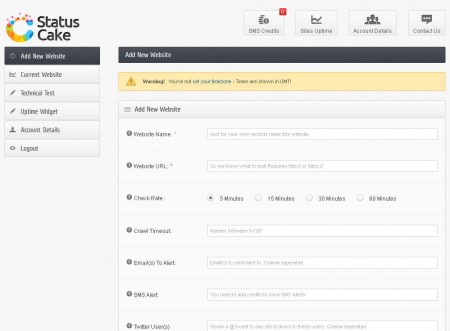
Configuring a website inside StatusCake is not very difficult, in the left sidebar select the top option, Add New Website and then simply start filling out the information that’s requested from you.
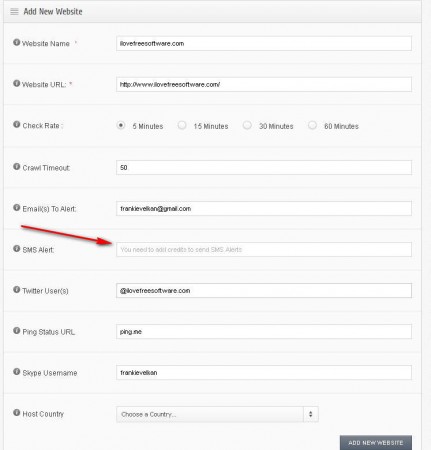
Required fields are marked with red stars, there’s actually just one required field, the Website URL field where you need to enter the address of the website for which you wish to monitor uptime. Paid feature of StatusCake that we mentioned would be the SMS website downtime notification, to use it you’re gonna have to fill your account with SMS Credits. Good thing is that next to SMS there’s several other ways of how you can be notified, as you can see from the image above, we have:
- Twitter notifications
- URL ping notification
- Email and
- Skype notifications
Check website technical status with StatusCake
Next to website uptime monitoring StatusCake can also check your website speed and other important website information.
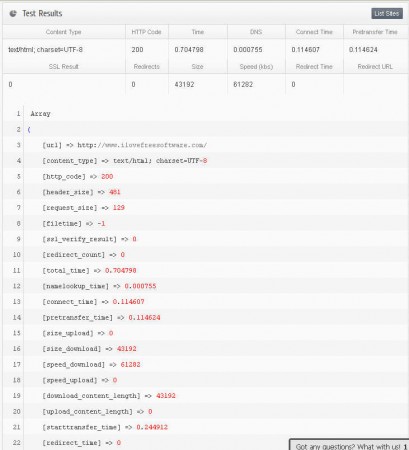
This is achieved with the help of the Technical Test, which can also be found in the left sidebar, right below the add website button. Uptime Widget can be installed on your website, click on the Uptime Widget in the menu on the left, copy the widget code and paste it to your website. StatusCake is a great way of how you can keep track of your website availability and best of all, it’s completely free, at least try it, it doesn’t cost you anything, and if you don’t like it, then just don’t use it, but we’re sure that that won’t be the case.
