• Home
  • Software Testing Service
  • About US
    • Privacy Policy
    • Disclosure
  • Write For Us
  • Submit Software
  • Contact Us
    • Subscribe
I Love Free Software
Best free software available all over the web. The free software categories include Windows Software, Social Networking Tools, and software installation videos.


  • Featured
  • Windows
  • Web Applications
  • App Store
  • Android
  • iPhone
  • iPad
  • Windows 8
  • Social Networking
  • Programming Tools

How To Delete Photo Album Created on iPad

By Lalit Aggarwal on October 24, 2011 | Sponsored Links

This is the continuation of the article “How to create new photo album on iPad”. In the previous article I wrote about this new feature of iOS 5 which allows you to create a new photo album in iPad and iPhone. But what if we want to delete photo album created on iPad or iPhone.

Yes, iOS 5 allows you to delete photo album created on iPad or iPhone. But please make a note that you cannot delete the photo albums that were synced through iTunes from your computer system. You can only delete photo albums that were created on the iPad or iPhone.

Also it is notable that when you give the delete command for a particular photo album, it doesn’t delete photos in the album. The delete command will only delete the folder and put the pictures contained in it back to the default folder.

Here is how to delete photo album created on iPad and iPhone:

Step 1: Click on “Photos” tab in the main menu. There you can see all your photo album folders.

How To Delete Photo Album Created on iPad
Sponsored Links

Step 2: Click on “Edit” option on the top right of the screen.

iPhone

Step 3: After that you will see a “cross sign” appear on the left top of the folders that were created on iPad or iPhone. Click on that “Cross Sign” for the folder you want to delete.

iPhone

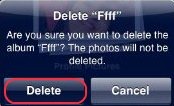
Step 4: A box will appear which will ask you to confirm that you want to “delete” the album or “cancel” it. Click on “Delete” to delete the album folder.
iPhone 2

Step 5: The folder album will be deleted and the photos which were in the folder will get transferred to their default folder.

Step 6: Likewise you can delete all the folders of your choice and then click on “done” option on the top right of the screen to exit the editing.

You can also check out photo sharing or photo editing apps for ipad, to edit and share your photos with your friends.

Now you can easily delete created photo albums without deleting the photos. Give it a try, its pretty simple.

Link to This Page:


You Might Also Like:

  1. How To Create A New Photo Album On iPad
  2. Photo Album Creator: Create Photo Albums in Executable Format
  3. FacePad: Free Facebook Photo Album Downloader
  4. Free Photo Editor App for iPad: Pic Stitch
  5. Free Photo Album Creator to Create Photo Album and Share Online: PhotoOnWeb

Be the first to know about Latest Free Software:

  • Join us on Facebook
  • Subscribe to our RSS Feed
  • Follow us on Twitter
  • Subscribe to Email Updates:

Posted in iPad, iPhone | Tagged ios, ipad, iPhone, photo album, photo albums | Leave a response

Lalit Aggarwal

« Previous Next »

Featured Posts

  • Top 7 Free Launchers for Android
  • 5 Free Snippet Managers To Manage Code Snippets
  • 5 Free Online Tools To Test Website In Different Resolutions
  • 5 Free Microsoft Access Alternatives
  • 5 Free IP Notifier Apps
  • 5 Online Mapping Websites
  • 5 Free Alternatives To iGoogle
  • 7 Websites To Download Windows 8 Themes

Join More than 15,000 Followers!

Enter your Email Address
  • Submit Software
  • Software Testing Service
  • Write For Us
  • About Us
  • Privacy Policy
  • Disclosure
  • Contact Us

Link to Us:

Did we review your software here? Feel free to flaunt this badge on your website:

Free Software

Use this Code:

Copyright © 2013 I Love Free Software.

Powered by WordPress and Hybrid. New - H