Prot-On is an application which you can use in order to control who has access to files that you share over the internet, via email or the cloud. With Prot-On you’ll be able to encrypt and protect images and documents that you have stored in online storage services like Dropbox, or the ones that you send as email attachments, completely free and it’s available on Windows, Mac, Android and iOS.
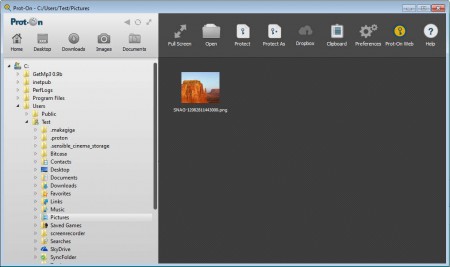
On the image above you can see the Prot-On File Explorer, which is the Windows application for creating encrypted images and documents. Browser plugins for Firefox and Internet Explorer are also available with which you can easily open and access images which were protected by simply right clicking them and selecting open with Prot-On option. Other interesting features offered by Prot-On are:
- Watermarking when printing protected files
- Setting up permissions, different users can have different privileges
- Protect images, PDF documents and Office files
- Online dashboard for keeping overview over protected files
- Protect and encrypt text when sending it over the internet
- Apps available for Windows, Mac, Android and iOS
Files which are protected with Prot-On will have similar names as the original, but with a “proton” addition to signify that the file is protected. The other person to whom you’re sending the files is also gonna have to have the Prot-On installed, it’s the only way that they will be able to access the files which you have sent, provided of course that you’ve given them permission to actually read the files.
Similar software: Images Mixer, Add Watermarks to Images.
How to protect images and documents online with Prot-On
Protecting files with Prot-On is very easy, all that you have to do is open up the Prot-On File Explorer, find the files that you want to protect and then simply right click on them and select Protect.
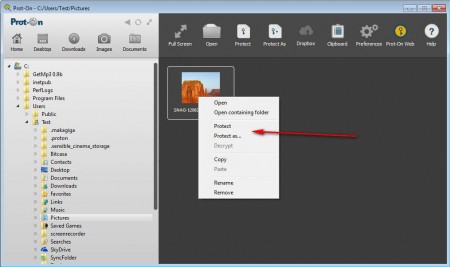
After you do that the program is gonna create another file next to the existing one, with the previously mentioned “proton” addition to its name. It won’t be possible to view, you won’t even see thumbnails for these photos when you’re browsing through them on your computer. You’ll only see a placeholder thumbnail with a message that the file is protected with Prot-On.
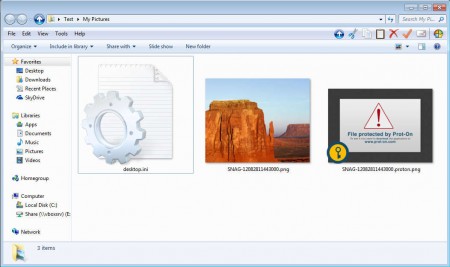
You’ll see something very similar when browsing image online or trying to open up PDF documents and Office files which were protected with Prot-On. To check what kind of permissions people have, you’ll have to open up the Prot-On website, sign in with your username and password and there go over the file permissions. Free accounts are only allowed to give out Read and Print permissions, while premium members can also allow users to Edit, Copy and Manage protected files.
Conclusion
Today content theft is a very common occurance and a lot of people are trying to find ways of how they can easily and safely share what they have created without actually giving other people full permissions to their work. With Prot-On you can do exactly that. Protected images and documents will only work in Prot-On, and if you didn’t choose, no one will be able to copy them. Try Prot-On and see how useful it can be.
