• Home
  • Software Testing Service
  • About US
    • Privacy Policy
    • Disclosure
  • Write For Us
  • Submit Software
  • Contact Us
    • Subscribe
I Love Free Software
Best free software available all over the web. The free software categories include Windows Software, Social Networking Tools, and software installation videos.


  • Featured
  • Windows
  • Web Applications
  • App Store
  • Android
  • iPhone
  • iPad
  • Windows 8
  • Social Networking
  • Programming Tools

Download Connectify – Turn Laptop into Wireless HotSpot

By Tom on May 21, 2010 | Sponsored Links

Connectify is a free software that turns your laptop into a wireless hotspot so that you can share internet with other computers around you. Connectify converts laptop to wireless router for any network it is connected to, as long as you are running Windows 7.

Connectify does function well though and it serves its purpose as an extra point of connection for wireless devices in your home or on the move. Having an extra router can also be useful for boosting connection speeds and getting internet connection in the more difficult to access areas of the home.
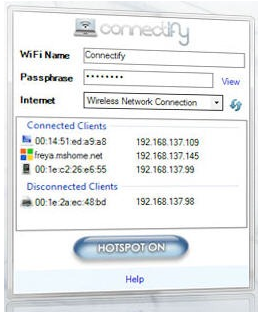
Wireless connection setup in Connectify.
Sponsored Links

Here are some of the features of Connectify:

  • Take any internet connection and share it wirelessly.
  • No additional hardware required.
  • Connect any wirelessly capable device to the network.
  • Unlimited devices can connect.
  • Free to download and use.
  • Do not pay for multiple device connection when on the move.
  • Kept secure using WPA2 encryption.

Turn your Laptop into a Wireless HotSpot:

The main advantage of software is to turn your laptop into a wireless hotspot is that it allows you to create another internet access point. This means that wireless connectivity is easy to achieve, regardless of where in the house you are. For example, you could quite easily have your main router downstairs and a laptop acting as a router upstairs. It’s simple.

If you need a wifi scanner, you can use Meraki Wifi Stumbler, and Easy Wifi.

Thoughts…

The biggest advantage of being able to convert your laptop into a wireless hotspot is that you can let other computers and devices around your laptop connect to that network. This would be especially handy while you are travelling and have more than one device to connect to internet. The only limitation of this software is that it works only with Windows 7.

Home Page: Click Here
Works With: Windows 7
Free / Paid: Free

Link to This Page:


No related posts.

Be the first to know about Latest Free Software:

  • Join us on Facebook
  • Subscribe to our RSS Feed
  • Follow us on Twitter
  • Subscribe to Email Updates:

Posted in Network Tools | Tagged free wifi, wireless hotspot | Leave a response

Tom

« Previous Next »

Featured Posts

  • 5 Apps For Windows 8 To Record Sound
  • Top 7 Free Launchers for Android
  • 5 Free Snippet Managers To Manage Code Snippets
  • 5 Free Online Tools To Test Website In Different Resolutions
  • 5 Free Microsoft Access Alternatives
  • 5 Free IP Notifier Apps
  • 5 Online Mapping Websites
  • 5 Free Alternatives To iGoogle

Join More than 15,000 Followers!

Enter your Email Address
  • Submit Software
  • Software Testing Service
  • Write For Us
  • About Us
  • Privacy Policy
  • Disclosure
  • Contact Us

Link to Us:

Did we review your software here? Feel free to flaunt this badge on your website:

Free Software

Use this Code:

Copyright © 2013 I Love Free Software.

Powered by WordPress and Hybrid. New - H