Google Translate is a free Android app to translate text from one language to other language on Android. Google Translate is really an intelligent app in Android Market to translate text on Android. Many a times it happens that you receive a message or an email containing the text in some other language which you don’t understand.
You can easily translate text into your preferred language on Android with Google Translate app. Google Translate converts each and every word accurately on Android. The speed of converting the text of the app is very fast on Android.
Just copy or import whole content and the app will automatically translate the whole text in one go on Android. Remember that the app only speaks short text on Android. Also, you can convert the text only into the languages which are in the apps list. However, the app list contains almost all languages.

You can also check out some other language translation extensions for Google Chrome reviewed by us.
Some Key Features Of Google Translate App To Translate Text On Android:
- Google Translate app helps you to translate text from one language to other language on Android.
- The interface provided by the app is very simple and provides easy options to translate text.
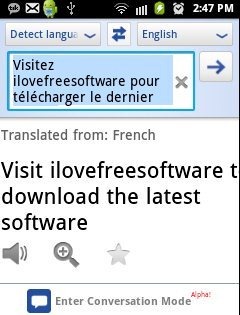
- You can select the language in which the text needs to be transferred.
- Displays the previous language and the current language in which the text is transferred.
- You can make the app read and speak the converted text.
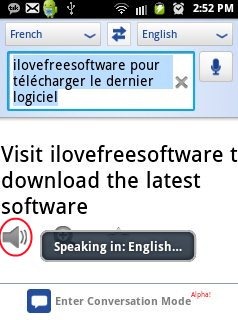
- You can enter the conversation mode to message chat on Android.
- You can share the converted text via Email, Dropbox, Bluetooth, Facebook and the like.
- Speak anything in some other language and the app will convert the language into your preferred language in the form of a text.
- The app provides you a long list of languages to select and translate text.
- Zoom in and Zoom out function available in the app.
- The setting options in the app is highly customizable.
Also, check out some other Android apps reviewed by us.
How To Install Google Translate App On Android:
- Scan the QR Code below.

- If you are logged in Android Market, then search for Google Translate app.
- Tap on install option whether you are installing the app by scanning the QR Code or from Android Market.
The free Google Translate app will be automatically installed. Click here to download Google Translate app from Android Market. Just translate text on Android in an easy way. If you don’t understand any message in some other language, then just copy or import the message in the app and translate it on Android.
