Task List Guru is free to do list manager which can help you manage your task list. It’s perfect for both small project and personal task management. It doesn’t stop at tasks; you could manage even your notes, task lists and reminders. Task List Guru holds the hierarchical structure in which you can show the tasks with various icons. You will be able to use total of 48 icons specially designed to represent your usual to-do tasks.
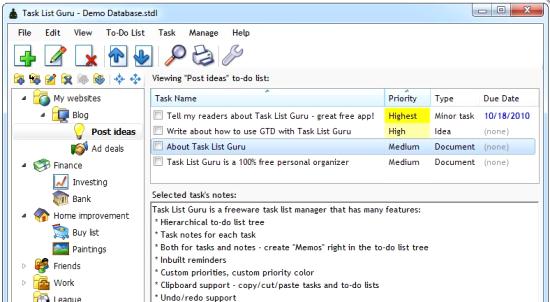
Let’s take a closer look at the way Task List Guru works. When it comes to each task, you can set its due date, task type and task priority. Moreover, you can add notes and reminders for each task.
Some other task managers that you can also try are: free online task manager, Task Coach, and ToDoTweet.
Let’s check out the important features of Task List Guru:
- You can set colors to the tasks according the priority parameter.
- If you wish you can keep the program always on top.
- It has got a nice layout and navigation which makes it easy to work on.
- The hierarchical tree structure of the task list is really cool to manage.
- You can keep detailed notes on each task.
- Just like the usual alarm clocks there is a snooze facility for the reminders you set.
- You can play with the basic look and feel of the software as you are free to set the font, colors etc.
- You can create notes in the trees.
- You can just undo or redo the previous action.
- Ordering of the task list is easy considering you can drag and drop tasks and task lists as you wish.
- You can take the database backup in an easy way.
- You can print the task list.
- You will be able to export the task list in to CSV and HTML formats.
- You can customize the priorities for each task.
- You can easily transfer tasks to another medium with a USB flash drive.
- Highlighting of the tasks is possible with the expiry date and today.
- The task list can be sorted according to any of the columns.
- Hotkey can be set to activate the program.
- To make the management easy, you can cut copy or paste the tasks and the task lists.
- Hotkey can be set to create a new task.
Task List Guru is a really nice and comprehensive way to manage all your tasks. However, it might become a bit overwhelming for some users who are looking for something very simple (like GeeTeeDee, and P2Do).
