Update Freezer is a software that can change settings of various different programs in order to disable automatic updating features which majority of popular programs have these days, which can sometimes be very annoying. Annoyance is not the only reason why some would decide to disable updating, there are situations when updating can be even problematic for work that people are doing on their computers, having Update Freezer installed on your computer can help make update management a little bit more easier.
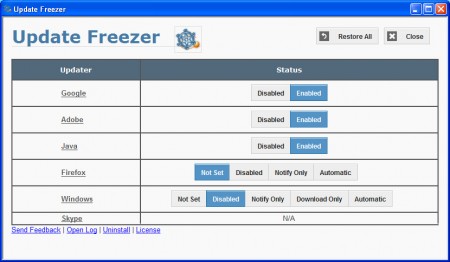
Depending on which software you have installed on your computer, some options might not be available for update editing when you first start Update Freezer. On the image above we can see that Skype is not installed, and therefore it is marked as N/A, while all the other program are there and can be managed with the help of Update Freezer. List of supported programs would be:
- Google (basically all Google programs, Chrome, Talk, Earth, Picasa)
- Adobe (again practically everything Adobe, Acrobat, AIR, Flash, CS)
- Java
- Firefox
- Windows (the entire system, but also Microsoft programs like Office)
- Skype
Software that do the opposite: Sumo, R-Updater, Filehippo.
Disabling software updates and how can it be useful?
When it comes to reasons for disabling updates of a certain program, they change from user to user. For example let’s imagine that someone does not have access to broadband connections, or they do have access to high-speed internet but are limited with traffic by their ISP. If you have a lot of programs installed with automatic updating turned on all of them, you can never know when an update will activate itself and put a strain on your internet connection, or start spending traffic.
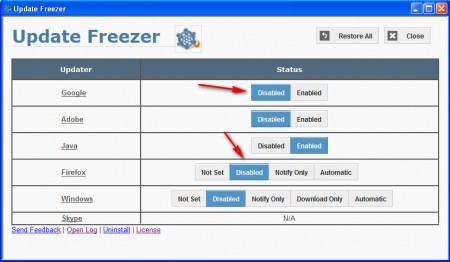
If you run Update Freezer you can have a clear overview of which applications exactly have automatic updating enabled, and then you can simply switch off the ones that you don’t want updated by clicking on the Disabled button, see image above. It’s not very hard to use Update Freezer, and if you want to revert options to what they were before you used Update Freezer you can click on the Restore All button in the top right corner of the application and everything will be returned to the way that it was.
Disable Firefox updating to preserve plugin compatibility
Mozilla has changed the version numbering of new Firefox releases and now practically every new version of Firefox that comes out has new version number, latest one of which would be 13. Various companies have complained that with this new rapid release method, they cannot keep upgrading Firefox to the newest versions, because it takes time, especially if the company is big. With Update Freezer this can be done easily, with just a few clicks, and there’s no need for going though the options and doing it manually. While you’re changing options for Firefox, you can also switch off updates for any of the other software that’s installed on the machine and that way keep custom made plugins running, without getting that nasty messages like, “plugin can’t be installed on insert_program_name_and_version_number_here”. All in all, a great tool, use it if you want to manage updates more easily.
