Piro is a free Chrome extension which is designed to work with the Pivotal Tracker website. For those who don’t know what Pivotal Tracker is and does, it’s a project management website used by teams for online collaboration and communication. If you’re running Chrome you can install Piro and use it in order to seamlessly integrate Pivotal website tracking into your Google Chrome web browser.
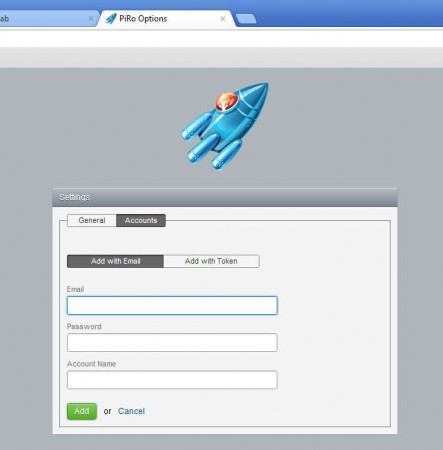
Before you’ll be able to use Piro, you’re gonna have to login with your Pivotal Tracker account details, or you can use a token generated on the Pivotal website. This small extension comes packed with several different useful functions which should make life a bit more easier it’s very easy to understand and use. Some of the more interesting features found in Pivotal tracker would be:
- Browse through the stories where you were mentioned
- Add new stories from within Piro
- Have an overview over your stories
- Checkup on stories which were requested by you
- Easy flipping through stories without switching windows
- Multiple account login is supported
Stories are how projects are organized on the Pivotal website, depending on what it is that you are gonna be doing, you can either be the one who owns stories or the one who’s requesting them, they have tasks and everything else that’s important for project management. In either case you can track them all with the help of Piro.
How to manage Pivotal Tracker with Piro – free Chrome extension
When you login to your Pivotal Tracker account, you’re gonna be greeted with a overview over the status of stories which you are a part of on the main website.
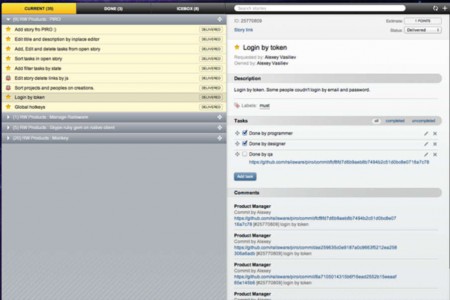
At the very top of the window you should see a toolbar where you can switch between Current stories, which would be the ones that your team is currently working on, and stories which are completed, this would be the Done tab, see image above. Next to these options to the right you can see a search box where you can search stories in order to find the one you need more easily, very useful for people with a lot on their plate. On the right you can see information displayed about the currently selected story on the left. You can see list of tasks, comments and of course a description. Stories can also be added.
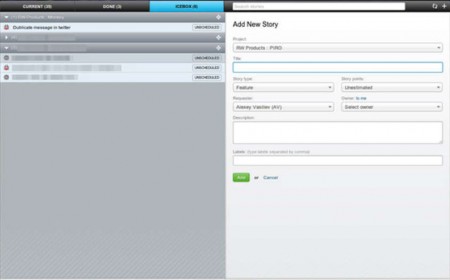
Enter all the important information about the story and then click Add and you should be able to see the story in the selected project of your Pivotal Tracker account.
Conclusion
With Piro keeping an eye on your Pivotal Tracker account get’s a lot more easier. Everything get’s integrated into your Chrome browser and you can be up to date without having to actually be on the main website. With Piro you can browse the internet and then simply switch to the Piro tab to see if there’s anything new in your Pivotal Tracker account. Extension not only that it’s free, but it’s also open source, install it to your Chrome Browser and see how it can help you out.
