WinMerge is a free software for comparing and merging files and directories. It highlights the changes between versions which later can be merged to get rid of redundant data. WinMerge is an open source application for Windows OS. It provides the diff command functionality of Linux in Windows environment.
Some of the other file and folder syncing tools that we reviewed earlier include File Synchronizer, and Synchredible.
How to use WinMerge:
The first and foremost task is to open the WinMerge window. A window with the title “Select Files and Folders” will pop up. Now in the left and right fields specify the files/folders which need to be compared for differences.
If you want to refine the search further, use the filter field. Depending on the regular expression used in this field only a subset of files will be included during the comparison process.
Now click on the ok button to start the comparison process.
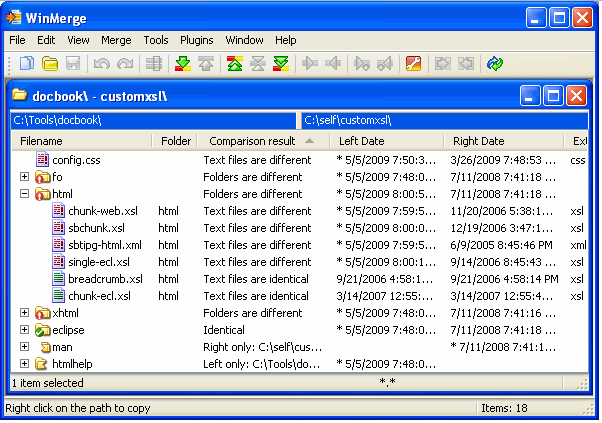
If folders were compared then as soon as the comparison completes a compare window opens which reveals the differences between the two folders.
All the results are displayed in a tabular format with the name of the file displayed in the extreme left column followed by columns containing additional information like – comparison result, left date, right date, extension etc.
But if files were compared, the comparison results are displayed side by side, in separate panes. The mismatched data is highlighted and displayed in the diff pane.
After discovering the discrepancies you can manage files and folders using the Merge menu.
Salient features of WinMerge:
- Tabular format for displaying the results of comparison
- Unicode support
- Background color highlights which makes the unmatched items stand out
- Generation of HTML report with highlighted mismatches
- Unpacker field used to apply Plug-ins during file comparisons
- Regular expressions or Regexp used in the filter field which provide a flexible means to compare files/folders by eliminating or including data
- Translation of user interface into several languages
- Word-wrap, line numbering and syntax coloring are few other features of WinMerge.
- WinMerge sorts out redundant files and folders and therefore, is of great help for those who want to achieve concurrency and version control.
If you want to compare images, you can try Microsoft SyncToy, or better still, you can use VisiPics to find similar looking photos.
