Qedic Quiz Maker and Player are two different applications which are part of the same quiz creation package. One is used for the creation of quizzes, that would be the Quiz Maker, that can be used during various different courses, like in school or at college. Quiz Player is only used to play quizzes created by the Quiz Maker, hence its name, Quiz Player. Both of these applications are free, and they are a great thing for any teacher or lecturer to have or at least try.
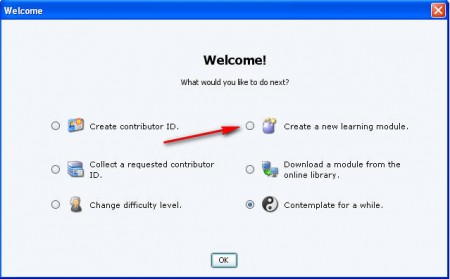
Since if there are no quizzes there isn’t anything for the Quiz Player to play, we’re gonna start by trying to create a quiz in the Quiz Maker. To run these applications you’re gonna need Java, a bit of warning to those who might not have it installed on their computers. The actual term that’s used for a quiz in the program is “learning module”, and when you start the program for the first time, you’re gonna have to select Create a new learning module, see image above. That should allow you to create a new quiz, which is very easy to do.
Creating a quiz in Qedic Quiz Maker
After selecting Create new learning module and then clicking OK, you will get another window where you need to name what the quiz or should I say module will be called and also determine what kind of background image will be used. After you click OK a few times, you will be presented with the following window:
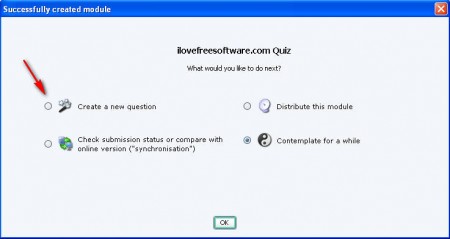
Select the option that’s pointed at the image above and you will be presented with a question editing window where you need to determine what kind of question you want to add. There are 5 different types of questions available to choose from:
- Multiple choice with radio buttons
- Typed response with letter prompt
- Jumbled sentences: drag and shift
- Pair-matching game (drag/drop)
- Categorizing (drag/drop)
Each one of these question types is suitable for a different situation, or should I say for a different question. We decided to go with the standard radio button format and here’s what we got:
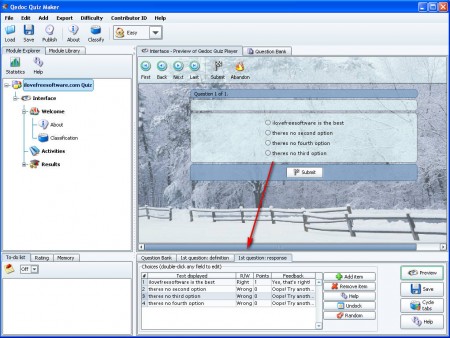
Down below where the arrow points, that’s where question can be edited. You can type in the answers and select which one of the answers is the correct one. Question should be typed in also, that’s kind of the most important part. Notice that on the image above we also have a preview of the question, that’s because if you download the Qedic Quiz Maker, Player comes bundled with it, so you don’t have to install it separately.
You can also check out TunesIQ, free quiz and trivia app.
The Quiz Player needs to be installed on computers which will only solve the Quiz, for that there’s no need to have the Maker installed. To open a quiz on another computer it has to be saved and exported from the one where it was created, which is easy as clicking on Export and selecting one of the options for exporting. There has to be 10 questions minimum before export is possible. This application pack is very interesting, and if you need to create a quiz perhaps for the kids to learn, then definitely try Qedoc Quiz Maker.
