Jotta is a free online file backup service which you can use to backup important documents and files from your desktop computers or laptops running Windows and Mac OS X, and also from your smartphones and tablets which are running iOS and Android. Using the client applications, they are available for free download, you can automate the backup process and have your files uploaded to the Jotta storage at scheduled times, without you having to get involved.
To use Jotta free online backup service you’re first gonna have to register and afterwards download the free client application which is gonna be used to upload and backup documents online. Free Jotta accounts can use up to 5GB of storage which is gonna be available to them without any kind of limitations, for as long as Jotta exists. Upgrades are also possible where you can pay in order to get unlimited storage, it is gonna set you back 7$ per month, which isn’t a lot when you think about all the space that you get. Other interesting features that Jotta has would be:
- Seamless access to the uploaded files via the desktop client
- Public access to backed up files – for sharing with people that you know
- Drag and Drop file uploads, with an option to schedule updates
- Search function to find important files more easily
- Application works in the system tray, monitors the system for backup
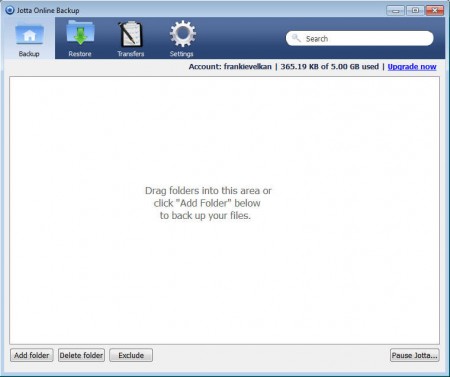
As you can see from the image above in order to start using Jotta. after the desktop client is installed and after you’ve logged in, you can start uploading files right away by dragging and dropping them onto the upload area. That should start the backup right away, but if you want to schedule uploads, you’re gonna have to play with options a bit more.
Similar software: File Secure Free, Ocster Backup.
How to backup files with Jotta – free online data backup service
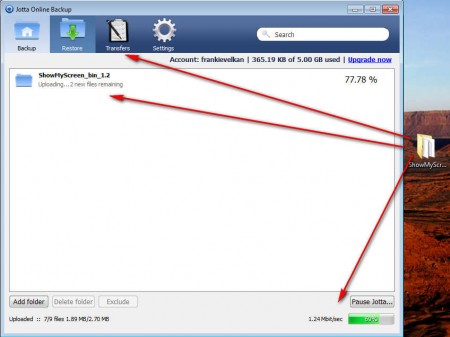
On the image above you can see image upload in progress. You can add several folders at once, and they are all gonna be uploaded, how fast depends on your internet connection. In the lower right corner notice that there’s an upload bar where you can see how much time you have left. The same thing can be seen in the Transfers tab, only there you can also see the status of the download, which can be started in the Restore tab.
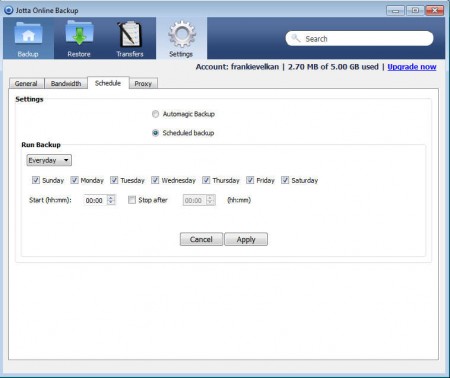
Backup scheduling for the added folders is made in the Settings tab under Schedule. There you can set day and hours that you want files backed up, as you can see on the image above. Folders added to the upload queue are gonna be monitored and if new files become present they are gonna be backed up automatically.
Conclusion
Jotta free online backup service is very simple to use and it offers a lot of space for the free accounts, more than enough for document and even photo backup. If you want more, simply upgrade to one of the paid accounts and you’ll receive unlimited space. Schedule your backups and see them go up automatically.
