Record My Call is a free Android app to record calls on Android. The app provides you customizable options to manage your call recordings in the app. All the options are very clear and easy to understand, so that you can record calls in an easy way on Android. Also, the app provides you the option to play call recordings directly from the app.
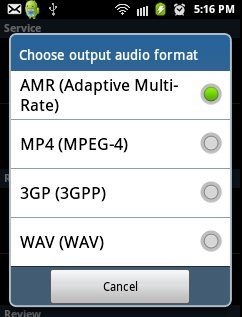
You can record calls in different formats on Android which includes AMR, MP4, 3GP and WAV audio formats. Just enable the app from the settings menu and the app will automatically record calls on Android including your outgoing and incoming calls.
This call recorder app uses your phone’s microphone to record calls on Android. This is the main reason why the app is unable to record the voice of the other person to whom you are talking. If you want to record the voice of the other person, then you need to talk by switching on the loudspeaker of your Android phone. By this, the app will be able to record voice of both parties. Apart from this, this call recorder app is an awesome app, to record calls on Android.
You can also check out AllCallRecorder app to record calls on Android reviewed by us.
Some Key Features Of Record My Call App To Record Calls On Android:
- The app allows you to record calls on Android in an easy way.
- You can transfer any recorded call in the Important List of the app.
- You can rename any recorded file from within the app.
- You can share any recording via Email, Bluetooth, Facebook, Dropbox and the like.
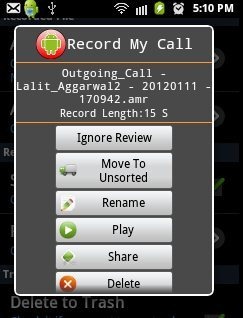
- Delete any recorded file from within the app.
- Move any file to SD card from within the app.
- Select from multiple audio formats which includes AMR, MP4, 3GP and WAV audio formats.
- The app allows you to enable auto delete function. You can set the time span according to your suitability.
- Also, adjust the review time according to your suitability.
- The app provides many other setting options, which are highly customizable.
Also, check out Call Recorder app for Android reviewed by us.
How To Install Record My Call App On Android:
- Search for Record My Call app in Android Market or scan the QR code below.

- If you are searching for Record My Call app in Android Market, then select Record My Call app from the searched list.
- Install Record My Call app by pressing on install button.
The free Record My Call app will be installed. Click here to download Record My Call app from Android Market. Now just record calls on Android at zero cost with this call recorder app for Android. Just be smart by making a voice of each conversation on your smart phone.
