Genius Vision is an IP video surveillance software that is intended for all those that have a security camera grid which are connected with each other with the help of Local Area Network, that’s the reason for the IP in the software name. With the help of this video surveillance software you can turn your webcam, or phone camera into a monitoring device.
Having security cameras installed on your property is always a good thing, especially now that the crime rates are on the rise pretty much everywhere, and there are a lot of scam artists out there. The easiest way of how to connect cameras would be with the help of a Local Area Connection and wireless video cameras. This way, there are no wires which have to be spread throughout the object that’s being monitored, there’s only mounting of cameras, and of course you need to pick the right software to use with your cameras, Genius Vision might just be the thing that you are looking for.
Using Genius Vision to network together security cameras
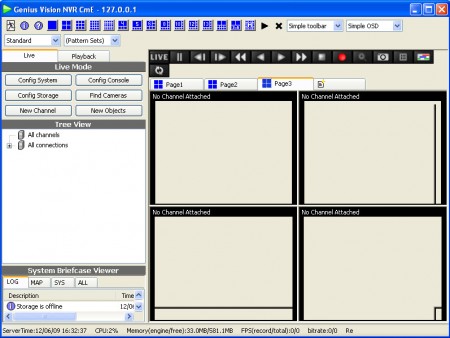
What you see on the image above is the default screen of Genius Vision, the free version of the program, which is the same as the paid version, but it’s limited to the number of channels that can be tracked to 16, and there’s also a limitation in the amount of channels that can be tracked with the help of the innovative IVS technology that this network video recorder software has.
IVS is an acronym for Intelligent Video System, which is basically what you can see in the movies, where video surveillance program is used in order to scan videos and search for a suspect, on the count of the facial features and a number of other characteristics, if we are not talking about a person search. Before you’ll be able to power up the main interface of the program, you’re gonna have to enter username and password, Genius Vision is password protected, so that unauthorized individuals are not able to access and use the application.
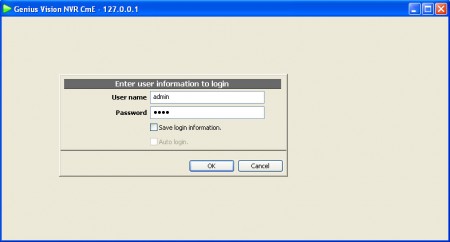
The default username and password are:
admin

1234
Program will offer you with the info when you hover your mouse over the input boxes. It’s best, in fact it’s necessary that you change this to something else once that you’re inside the actual program.
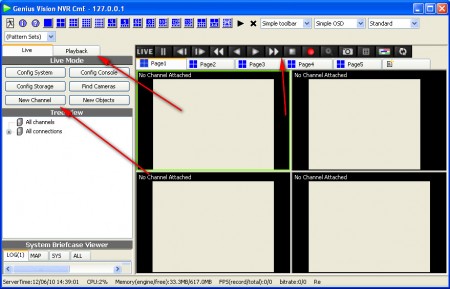
What’s more important is to know how to actually add cameras to the program. If your network is properly setup and connected to the PC where the program is installed then to add a camera you will have to click on New Channel. If everything is OK, the camera should show up in a new channel at the center.
Features that Genius Vision has would be this:
- Recording, pausing, playback
- Multi channel video support
- 360° video recording, depending on the camera of course
- 64bit native support, servers can have over 4GB of memory.
These are just some of the more important features that this software has, and if you are looking for software that you can use for your security system and if you decide to go with Genius Vision then you will definitely discover more.
