Call Recorder is a free Android app to record calls on Android. This call recorder app is very good application in Android Market to record calls on your Android phone in an easy way. The app doesn’t provide any extra option. The app only provides a simple option to record calls including your outgoing and incoming calls on Android. You don’t have to tap anywhere on Android screen to record any incoming or outgoing call, as the app works in the background once installed.
As soon as you install the app, just press on “Start Recording Calls” button and minimize the app. Remember that you only minimize the app with the home button on your phone, as the app will not work if you exit it with back button. This call recorder app is specially designed only for Sony Ericsson phones. There might be a possibility that the app can work on other Android phones as well, but there is no guarantee that the app will surely work on other Android phones. The app records calls and saves all your recordings to SD card.

You can also check out AllCallRecorder app to record calls on Android reviewed by us.
Some Key Features Of Call Recorder App To Record Calls On Android:
- You can record calls on Android including both incoming and outgoing calls.
- The interface provided by the app is quite simple.
- You can play the recording from within the inbuilt player of the app.
- Displays all the call recordings in a list view.
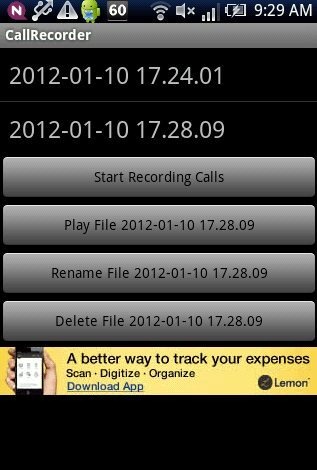
- You can rename any recorded file from within the app.
- Delete any recorded file anytime from the app.
- The app provides the accurate date and time of the call recorded.
Also, check out some other call recorder apps for Android reviewed by us.
How To Install Call Recorder App On Android:
- Scan the QR Code below with Barcode Scanner app.

- If you don’t have a Barcode Scanner, then install the Call Recorder app from Android Market.
- Search for Call Recorder app
- Press Install.
The free Call Recorder app will be installed. Click here to download Call Recorder app from Android Market to record calls on Android. Record calls anytime with Call Recorder app on your Android phone when required.
