PicMonkey is a free online image editing service where you can upload your own photos edit or decorate them in several different ways, with several different effects and then save them on your computer. This is perfect for all those who are on the go, or for all those who do not have access to a computer with image editing software installed. If you’re on the run most of the time, then you’ll probably have a laptop, with PicMonkey you don’t have to have photo editing software installed, it will do all the basic operations like:
- Crop
- Rotate
- Exposure
- Colors
- Sharpen
- Resize
and for each one of these there are dozen more cool image effect that you can add to your photos with the help of PicMonkey. Let’s see how exactly can this free online image editing service help you out, because there are a lot of situations where you might need a quick image editing tool, best of all, PicMonkey offers more than just basic editing, a lot more.
Similar Software: 5 Free Software to Retouch Photo.
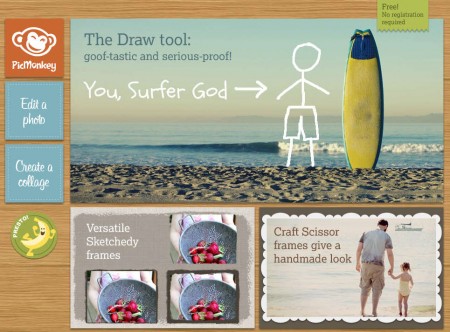
Free online photo editing with PicMonkey
Image above is the PicMonkey web page where you can see on the left that next to image editing PicMonkey also offers collage making tool, where you can for example convert your vacation photos into a beautiful collage, but photo editing is really what makes this free online image editing service great, mainly because that’s where you get to create amazing Photoshop like effects in just a few clicks.
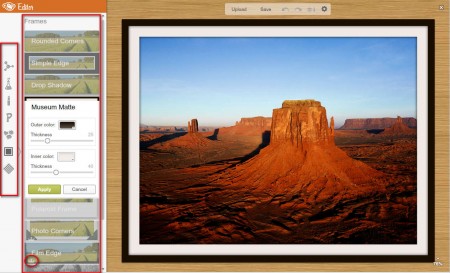
Here we have an image opened and enhanced with PicMonkey. To open an image for editing inside PicMonkey, click on the Edit Image button on the main website. Wait for the image to upload and then the editor which you can see on the image above will show up. List of tools that we mentioned in the beginning is just a small part of what PicMonkey has to offer. In the square on the left side, there are 7 different image editing tool groups:
- Basic edits – tools from here are listed above
- Effects – can be seen on the second image
- Touch up – last minute image improvements
- Text – add text to images
- Overlays – add overlays effects
- Frame – for adding several different frame types
- Textures – improve photos with various different textures
Create collages online for free with PicMonkey
You can start creating collages by clicking on the Create Collage button, which is right below the Edit Image button. Default PicMonkey gallery will open:
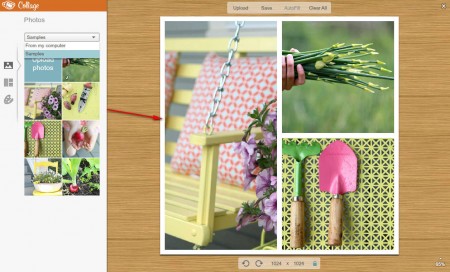
You can of course change that and open up your own images. They will then become available in the gallery on the left, and you will be able to drag and drop them on the collage making area to the right. After you’ve added images you can adjust them additionally so that they display the parts that you want in the collage. After you are done, in the upper part of the window select Save and export the collage, or if you were editing an image, save the image to your computer and you’re done. For now all the PicMonkey tools are free, but once it’s out of beta, some of them will require paid subscription. We said only some, there will still be free ones available, so make sure to give PicMonkey a try.
