• Home
  • Software Testing Service
  • About US
    • Privacy Policy
    • Disclosure
  • Write For Us
  • Submit Software
  • Contact Us
    • Subscribe
I Love Free Software
Best free software available all over the web. The free software categories include Windows Software, Social Networking Tools, and software installation videos.


  • Featured
  • Windows
  • Web Applications
  • App Store
  • Android
  • iPhone
  • iPad
  • Windows 8
  • Social Networking
  • Programming Tools

iShutDown Timer To Schedule Computer Shutdown

By Ishan Bansal on April 7, 2011 | Sponsored Links

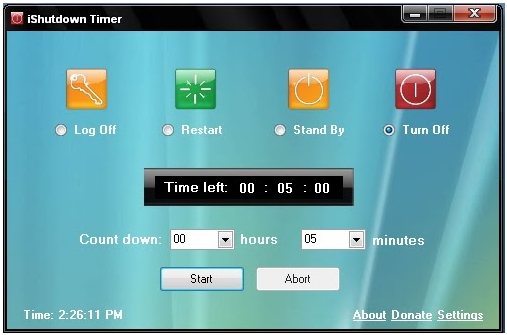
iShutDown Timer is a free shutdown timer using which you can specify the time to schedule computer shutdown. Apart from automatically shutting down your computer, it even allows you to schedule computer restart, log off or stand by. So these operations are also performed automatically on their specified scheduled time. This free shutdown timer allows you to specify time in hours and minutes, and this software will perform the action assigned to it after that specified time.
iShutdown Timer
Sponsored Links

The user interface of this shutdown timer is pretty cool and small; and comes with 4 main functions that it performs automatically, which are Log off, Restart, Turn off, and stand by. It even includes a timer, where you can specify the time in hours and minutes. The interface even shows you the time left for computer shutdown, restart, log off or stand by, which ever function you choose.

Features Of This Tool To Schedule Computer Shutdown:

  • Let’s you schedule computer shutdown, restart, log off, or standby.
  • Lightweight and portable shutdown timer.
  • Shows you the time left in computer shutdown.
  • Very Basic and straight-forward user-interface.
  • Easy to use shutdown timer software.
  • Shows the default system time.

How to Schedule Computer Shutdown:

This shutdown timer is easy to use, as you simply need to choose any of the function: Shutdown, Log Off, Restart, or Stand by. Now specify your desired shutdown time in hours and minutes within the countdown hours and minutes box. Then click on the “Start” button, and it will start a countdown timer which will show you time left before computer will go down. Other similar software we reviewed earlier are: Sleep Timer, and WinMend Auto ShutDown.

iShutdown Timer is a smart and easy to use software using which you can schedule computer shutdown, restart, log off or stand by. Download and try iShutdown timer for free.

Home Page: Click Here
Works With: Windows
Free / Paid: Free

Link to This Page:


You Might Also Like:

  1. Free Software To Schedule Computer Start Up And Computer ShutDown
  2. Schedule Computer Shutdown Using ShutDown Timer
  3. How to Schedule Shutdown, Hibernate, Restart, and Standby on PC
  4. Free Timer Software For Windows: Free Desktop Timer
  5. WinMend Auto Shutdown: Free PC Auto Shutdown Software

Be the first to know about Latest Free Software:

  • Join us on Facebook
  • Subscribe to our RSS Feed
  • Follow us on Twitter
  • Subscribe to Email Updates:

Posted in System Utilities | Tagged shutdown, sleep timer | Leave a response

Ishan Bansal

« Previous Next »

Featured Posts

  • 5 Free Snippet Managers To Manage Code Snippets
  • 5 Free Online Tools To Test Website In Different Resolutions
  • 5 Free Microsoft Access Alternatives
  • 5 Free IP Notifier Apps
  • 5 Online Mapping Websites
  • 5 Free Alternatives To iGoogle
  • 7 Websites To Download Windows 8 Themes
  • 5 Best Free Calculator Apps For Windows 8

Join More than 15,000 Followers!

Enter your Email Address
  • Submit Software
  • Software Testing Service
  • Write For Us
  • About Us
  • Privacy Policy
  • Disclosure
  • Contact Us

Link to Us:

Did we review your software here? Feel free to flaunt this badge on your website:

Free Software

Use this Code:

Copyright © 2013 I Love Free Software.

Powered by WordPress and Hybrid. New - H